![CAD Forum - tips, tricks, discussion and utilities for AutoCAD, Inventor, Revit and other Autodesk products [www.cadforum.cz]](../common/arkance_186.png "CAD Forum - ARKANCE Community - tips, tricks, discussion and utilities for AutoCAD, Inventor, Revit and other Autodesk products [www.cadforum.cz]")
CAD FORUM - TIPS & TRICKS | UTILITIES | DISCUSSION | BLOCKS | SUPPORT | HELP & ASSISTANCE

 What is the ARKANCE Community?
Over 1.124.000 registered users (EN+CZ).
AutoCAD tips, Inventor tips, Revit tips, Civil tips, Fusion tips.
The new Beam calculator, Spirograph generator and Regression curves in the Converters section.
New AutoCAD 2027 commands and sys.variables

 CAD tip # 8956:
Question
A
A regular component array in an Inventor assembly (Assemble > Component > Pattern) can be exploded (dissolve, break) back to individual independent components (elements). Their position will not change.
Right-click on a pattern component in the assembly browser tree and choose "Independent" from the context menu. An independent element will be marked with an icon with red "x". Do not choose the first (source) element of the pattern.
If you want to explode the whole pattern, select the individual pattern elements (except the first) in the tree with the Shift key and then rt-click to choose "Independent".
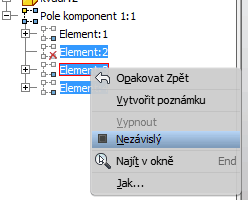
Note: If you change an independent component back to a dependent one, its independent copy will not be deleted (will be 2x in the assembly)
See also the iLogic code in Tip 9263
Inventor

 *CAD
*CAD
6.12.2012
31995×
this tip shared by ARKANCE experts applies to: Inventor ·


CADforum
Tips, tricks, utilities, help, how-tos and FAQ for AutoCAD, LT, Inventor, Revit, Map, Civil 3D, Fusion, Forma, 3ds Max and other Autodesk software (community support by ARKANCE). See About CADforum.
Copyright © 2026 | Advertise with us | Online privacy





