![CAD Forum - tips, tricks, discussion and utilities for AutoCAD, Inventor, Revit and other Autodesk products [www.cadforum.cz]](../common/arkance_186.png "CAD Forum - ARKANCE Community - tips, tricks, discussion and utilities for AutoCAD, Inventor, Revit and other Autodesk products [www.cadforum.cz]")
CAD FORUM - TIPS & TRICKS | UTILITIES | DISCUSSION | BLOCKS | SUPPORT | HELP & ASSISTANCE

 What is the ARKANCE Community?
Over 1.134.000 registered users (EN+CZ).
AutoCAD tips, Inventor tips, Revit tips, Civil tips, Fusion tips.
See the new Beam calculator, Engineering calculator, Tolerances, Spirograph generator and Regression curves in the Converters section.
New AutoCAD 2027 commands and sys.variables

 CAD tip # 10102:
Question
A
You received a too complex and detailed 3D model as a surface mesh and now you need to simplify it before using it for 3D printing, 3D rendering or converting it to a solid 3D CAD model.
An ideal tool for processing very large 3D mesh models is Autodesk Memento (Autodesk Labs, memento.autodesk.com). This free (status: 1/2015) application allows to simplify (decimate) a model without changing its shape, to solve topology problems (holes, overlaps, spikes), to retopologize (re-mesh) the model, set its scale, 3D print it and perform other operations.
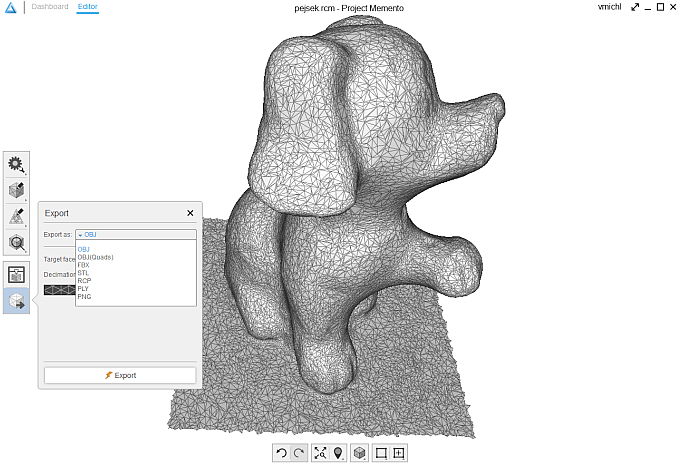
You can import 3D mesh models in the formats STL, PLY, OBJ and RCM. Processed meshes can be exported to the formats OBJ, FBX, STL, RCP, PLY.
MementoMax

 *CAD
*CAD
19.11.2014
23564×


CADforum
Tips, tricks, utilities, help, how-tos and FAQ for AutoCAD, LT, Inventor, Revit, Map, Civil 3D, Fusion, Forma, 3ds Max and other Autodesk software (community support by ARKANCE). See About CADforum.
Copyright © 2026 | Advertise with us | Online privacy





