![CAD Forum - tips, tricks, discussion and utilities for AutoCAD, Inventor, Revit and other Autodesk products [www.cadforum.cz]](../common/arkance_186.png "CAD Forum - ARKANCE Community - tips, tricks, discussion and utilities for AutoCAD, Inventor, Revit and other Autodesk products [www.cadforum.cz]")
CAD FORUM - TIPS & TRICKS | UTILITIES | DISCUSSION | BLOCKS | SUPPORT | HELP & ASSISTANCE

 What is the ARKANCE Community?
Over 1.134.000 registered users (EN+CZ).
AutoCAD tips, Inventor tips, Revit tips, Civil tips, Fusion tips.
See the new Beam calculator, Engineering calculator, Tolerances, Spirograph generator and Regression curves in the Converters section.
New AutoCAD 2027 commands and sys.variables

 CAD tip # 10139:
Question
A
The freeware application ARKANCE UnitsConversion is a "unit converter" add-on tool palette for AutoCAD 2014, 2015 and higher. This tool performs conversion of hundreds of international and historical physical units - length, area, volume, force, temperature, time, speed, density, force, moments, energy, acceleration, flux, luminosity, electric charge, fuel consumption or numerical systems (binary, hex, roman...).
The command palette uses the interactive online units converter from www.cadforum.cz/en/units.asp directly in AutoCAD user environment. You can display this palette using the command CONVERTUNITS or with the icon "Convert Units" in the ribbon Add-ins.
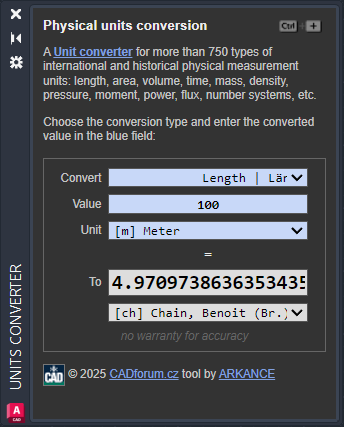
You can install the application easily through Autodesk Apps, or alternatively by unpacking the downloaded ZIP archive (the app .bundle) to the folder:
C:\Users\{USERNAME}\AppData\Roaming\Autodesk\ApplicationPlugins\
or:
C:\ProgramData\Autodesk\ApplicationPlugins\
Download UnitsConversion from  Download
ACAD2025ACAD2020ACAD2016ACAD2014

 *CAD
*CAD
15.12.2014
14853×
this tip shared by ARKANCE experts applies to: AutoCAD 2025 · AutoCAD 2020 · AutoCAD 2016 · AutoCAD 2014 ·


CADforum
Tips, tricks, utilities, help, how-tos and FAQ for AutoCAD, LT, Inventor, Revit, Map, Civil 3D, Fusion, Forma, 3ds Max and other Autodesk software (community support by ARKANCE). See About CADforum.
Copyright © 2026 | Advertise with us | Online privacy





