![CAD Forum - tips, tricks, discussion and utilities for AutoCAD, Inventor, Revit and other Autodesk products [www.cadforum.cz]](../common/arkance_186.png "CAD Forum - ARKANCE Community - tips, tricks, discussion and utilities for AutoCAD, Inventor, Revit and other Autodesk products [www.cadforum.cz]")

 What is the ARKANCE Community?
 CAD tip # 7852:
Question
But if you need to perform this and many other functions much more conveniently, more precisely, much faster and in full resolution, you can use the add-on application Plex.Earth Tools by Plexscape. This tool allow to use the Google Earth data not only in Civil 3D but in all versions of AutoCAD - i.e. also in AutoCAD Architecture.
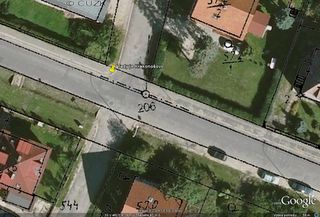
Plex.Earth Tools is a simple to use add-on application which automatically inserts the whole mosaic of aligned, tiled color maps covering the complete area of your project - in a single step, on one click. You can specify a polygon to cover (with overlaps) or a buffer-zone (bands) along a corridor (roads, rivers, etc.). Plex.Earth understands over 2.500 regional coordinate systems so you can keep your project in a standard setup.
You can also use this software in the opposite way - to publish your CAD models directly to Google Earth. The latest version of PlexEarth supports also importing 3D terrains from GE to AutoCAD DWGs (digital terrain models) including contour lines.
Thanks to the support of WMS data sources in Google Earth (overlay) you can use it also to insert other types of GIS and cadastral data from online WMS resources. Google Earths acts as a middleware application in this case (see WMS details - in Czech).
You can find more information, including videos on the Plex.Earth page.

 *CAD
*CAD







