![CAD Forum - tips, tricks, discussion and utilities for AutoCAD, Inventor, Revit and other Autodesk products [www.cadforum.cz]](../common/arkance_186.png "CAD Forum - ARKANCE Community - tips, tricks, discussion and utilities for AutoCAD, Inventor, Revit and other Autodesk products [www.cadforum.cz]")

 What is the ARKANCE Community?
 CAD tip # 5593:
Question
Google Earth Extension is an ARX module for AutoCAD 2008+ (a limited version is available also for AutoCAD 2007) which adds functions allowing to publish 3D models to the KML and KMZ formats (e.g. to place a building to a Google Earth map), to import raster maps from Google Earth to AutoCAD, and recently also to automatically generate a digital terrain model (DMT) in your DWG drawing - at the location specified in Google Earth.
When you load the Google Earth Extension module, AutoCAD "learns" new commands ImportGEimage (raster import), ImportGEmesh (3D model import), GEtime (time attributes for publishing, for GE time slider) and PublishKML (3D model publishing).
The most interesting function is ImportGEmesh. Launch the Windows application Google Earth and fly to the area of your interest (building parcel, wild terrain of Grand Canyon, anything). Switch back to AutoCAD and from the Google Earth toolbar run the ImportGEmesh command. This command loads the currently displayed data from Google Earth, generates a 3D polygon mesh (32x32) of the terrain model in the given Earth location and even applies a material texture created from the raster image of the same location. In your DWG drawing you will so get a real 3D model of the specified location, ready for placing a building or other scene. The result is not only a good overview of terrain conditions in any location on the globe but also a very easy way to convincing 3D visualisations.
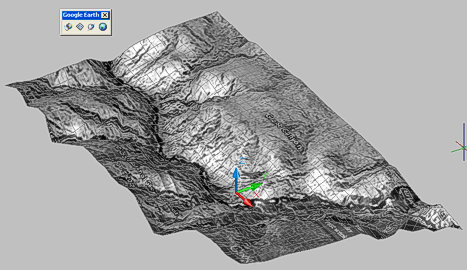
Grand Canyon 3D model in AutoCAD - a single mouse click
The function "File > Import > Import image and surface from Google Earth" in Civil 3D directly generates a more precise full terrain model.
The Google Earth Extension is no longer available!

 *CAD
*CAD







