![CAD Forum - tips, tricks, discussion and utilities for AutoCAD, Inventor, Revit and other Autodesk products [www.cadforum.cz]](../common/arkance_186.png "CAD Forum - ARKANCE Community - tips, tricks, discussion and utilities for AutoCAD, Inventor, Revit and other Autodesk products [www.cadforum.cz]")
CAD FORUM - TIPS & TRICKS | UTILITIES | DISCUSSION | BLOCKS | SUPPORT | HELP & ASSISTANCE

 What is the ARKANCE Community?
Over 1.129.000 registered users (EN+CZ).
AutoCAD tips, Inventor tips, Revit tips, Civil tips, Fusion tips.
The new Beam calculator, Spirograph generator and Regression curves in the Converters section.
New AutoCAD 2027 commands and sys.variables

 CAD tip # 6064:
Question
A
If you find a 2D arrow ("flower") or a color 3D cone in your drawing and this artifact entity cannot be selected, it is probably the "geomarker" placed to that position with the GEOGRAPHICLOCATION command:
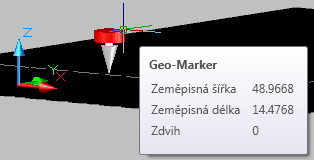
There are three ways to specify the geo-location:
- manually enter the latitude and longitude data (e.g. from a GPS), plus the north direction
- import (load) the current position from the running Google Earth application
- import an existing KML or KMZ file in the Google Maps format (see e.g. the KML file with CAD Studio's offices - you can enter its web URL directly in the Import KML dialog)
ACAD2014ACAD2012ACAD2009ADT2009Map2009Civil2009

 *CAD
*CAD
3.4.2008
25143×
this tip shared by ARKANCE experts applies to: AutoCAD 2014 · AutoCAD 2012 · AutoCAD 2009 · AutoCAD Architecture 2009 · AutoCAD Map 3D 2009 · Civil 3D 2009 ·


CADforum
Tips, tricks, utilities, help, how-tos and FAQ for AutoCAD, LT, Inventor, Revit, Map, Civil 3D, Fusion, Forma, 3ds Max and other Autodesk software (community support by ARKANCE). See About CADforum.
Copyright © 2026 | Advertise with us | Online privacy





