![CAD Forum - tips, tricks, discussion and utilities for AutoCAD, Inventor, Revit and other Autodesk products [www.cadforum.cz]](../common/arkance_186.png "CAD Forum - ARKANCE Community - tips, tricks, discussion and utilities for AutoCAD, Inventor, Revit and other Autodesk products [www.cadforum.cz]")
CAD FORUM - TIPS & TRICKS | UTILITIES | DISCUSSION | BLOCKS | SUPPORT | HELP & ASSISTANCE

 What is the ARKANCE Community?
Over 1.132.000 registered users (EN+CZ).
AutoCAD tips, Inventor tips, Revit tips, Civil tips, Fusion tips.
See the new Beam calculator, Engineering calculator, Tolerances, Spirograph generator and Regression curves in the Converters section.
New AutoCAD 2027 commands and sys.variables

 CAD tip # 6251:
Question
A
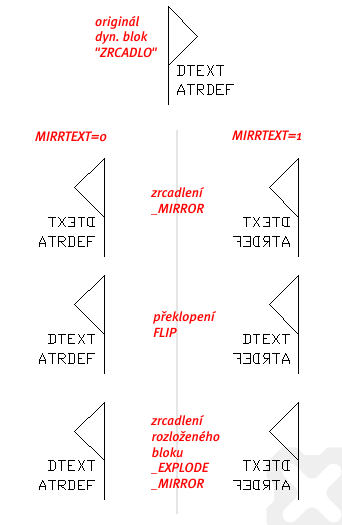
Text mirroring (readability, backwards text) in AutoCAD is controlled by the MIRRTEXT variable. But if the text is contained in a block or a dynamic block, it may behave differently when mirrored.
Th following illustration presents various options for mirroring of a simple block "ZRCADLO" (for download in the Block catalog) which contains a text (Dtext) and a predefined attribute (AtrDef). The original block is always mirrored with both settings of the MIRRTEXT variable: MIRRTEXT=0 and MIRRTEXT=1; first using a simple mirror with the MIRROR command, then flipping with the "Flip" action of the dynamic block, and finally by mirroring simple entities after exploding of the block reference (_EXPLODE).
As you can see, there are many differences in the individual cases (tested in AutoCAD 2008):
See also text justification in the Tip 11198.
ACADADTACLTACADM

 *CAD
*CAD
7.8.2008
33692×
FAQ


CADforum
Tips, tricks, utilities, help, how-tos and FAQ for AutoCAD, LT, Inventor, Revit, Map, Civil 3D, Fusion, Forma, 3ds Max and other Autodesk software (community support by ARKANCE). See About CADforum.
Copyright © 2026 | Advertise with us | Online privacy





