![CAD Forum - tips, tricks, discussion and utilities for AutoCAD, Inventor, Revit and other Autodesk products [www.cadforum.cz]](../common/arkance_186.png "CAD Forum - ARKANCE Community - tips, tricks, discussion and utilities for AutoCAD, Inventor, Revit and other Autodesk products [www.cadforum.cz]")

 What is the ARKANCE Community?
 CAD tip # 6439:
Question
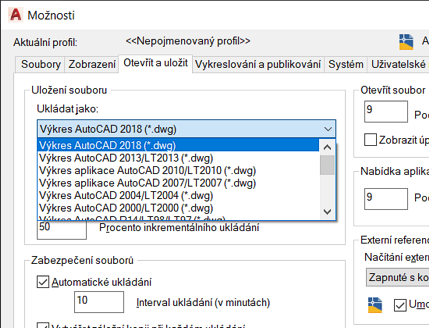
The default save format in AutoCAD is controlled by the environment variable "DefaultFormatForSave". This value is stored in the Registry - e.g.:
HKEY_CURRENT_USER\Software\Autodesk\AutoCAD\R17.2\ACAD-7001:409\Profiles\<< Unnamed profile >>\General
and you can set it with the function (setenv).
This variable can be set to the following values:
- 64 - AutoCAD 2018 DWG format
- 60 - AutoCAD 2013 DWG format
- 48 - AutoCAD 2010 DWG format
- 36 - AutoCAD 2007 DWG format
- 24 - AutoCAD 2004 DWG format
- 12 - AutoCAD 2000 DWG format
Other possible values for DefaultFormatForSave are e.g. 1=R12 DXF, 13=2000 DXF, 37=2007 DXF, 49=2010 DXF, 50=2010 DWT, 61=2013 DXF, 62=2013 DWT, 65=2018 DXF, 66=2018 DWT
Alternatively, you can preset the Save/SaveAs format using the following LISP code (format codes see above):
(vl-load-com)
(setq acadobj (vla-get-application (vlax-get-acad-object))
      acadoptions (vla-get-preferences acadobj)
      acadopensave (vla-get-opensave acadoptions)
      acadsaveastype (vla-get-saveastype acadopensave)
)
(vla-put-saveastype acadopensave 60)
Note: these settings do not apply to DWG export commands, e.g. EXPORTTOAUTOCAD, EXPORTC3DDRAWING, etc. - these have to be setup directly in their options, e.g.:


 Win,MacOSCAD







