![CAD Forum - tips, tricks, discussion and utilities for AutoCAD, Inventor, Revit and other Autodesk products [www.cadforum.cz]](../common/arkance_186.png "CAD Forum - ARKANCE Community - tips, tricks, discussion and utilities for AutoCAD, Inventor, Revit and other Autodesk products [www.cadforum.cz]")
CAD FORUM - TIPS & TRICKS | UTILITIES | DISCUSSION | BLOCKS | SUPPORT | HELP & ASSISTANCE

 What is the ARKANCE Community?
Over 1.124.000 registered users (EN+CZ).
AutoCAD tips, Inventor tips, Revit tips, Civil tips, Fusion tips.
The new Beam calculator, Spirograph generator and Regression curves in the Converters section.
New AutoCAD 2027 commands and sys.variables

 CAD tip # 6445:
Question
A
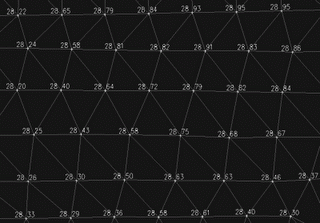
The display options for DTM surfaces in AutoCAD Civil 3D do not offer displaying of point elevation labels. If need to show elevations on a surface model, you can use the SurfacePoints utility.
The free LISP utility CADstudio SurfacePoints automatically creates point objects on the selected surface of your edited terrain. You can label these points with customized formatted annotations. Points are created in a separate, overwritable point group "CADstudio-SurfacePoints".
You can download the application from  Download.
Civil2014Civil2010Civil2008

 *CAD
*CAD
19.12.2008
18810×


CADforum
Tips, tricks, utilities, help, how-tos and FAQ for AutoCAD, LT, Inventor, Revit, Map, Civil 3D, Fusion, Forma, 3ds Max and other Autodesk software (community support by ARKANCE). See About CADforum.
Copyright © 2026 | Advertise with us | Online privacy





