![CAD Forum - tips, tricks, discussion and utilities for AutoCAD, Inventor, Revit and other Autodesk products [www.cadforum.cz]](../common/arkance_186.png "CAD Forum - ARKANCE Community - tips, tricks, discussion and utilities for AutoCAD, Inventor, Revit and other Autodesk products [www.cadforum.cz]")

 What is the ARKANCE Community?
 CAD tip # 7241:
Question
But if you are only a "consumer" of a DWG drawing and you have not available the AutoCAD license, the situation is more complicated. The drawing text search function is included in the free CAD viewer Autodesk Design Review. This program can process drawings in the DWF, DWFx and also DWG and DGN formats. So you can use its function (button) Find in the ribbon Home > Search and enter the searched text. The Find panel lists all occurrences of the searched text in the drawing (in its text entities, drawing properties, titles, etc.). Double-click on the individual items in the list to zoom to the specific occurrence of the searched text.
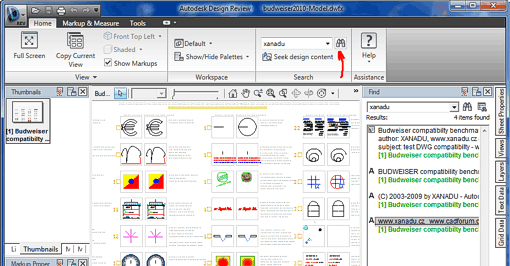
Due to the way of conversion (publishing) of the DWG drawings to DWF, you can search only texts written in a TrueType font (not SHX - they are published as vectors).
To look-up a specific text in a group of drawings you can use e.g. the srxText utility or the indexed contents of DWG drawings stored in the document-management application iProject.

 *CAD
*CAD







