![CAD Forum - tips, tricks, discussion and utilities for AutoCAD, Inventor, Revit and other Autodesk products [www.cadforum.cz]](../common/arkance_186.png "CAD Forum - ARKANCE Community - tips, tricks, discussion and utilities for AutoCAD, Inventor, Revit and other Autodesk products [www.cadforum.cz]")
CAD FORUM - TIPS & TRICKS | UTILITIES | DISCUSSION | BLOCKS | SUPPORT | HELP & ASSISTANCE

 What is the ARKANCE Community?
Over 1.133.000 registered users (EN+CZ).
AutoCAD tips, Inventor tips, Revit tips, Civil tips, Fusion tips.
See the new Beam calculator, Engineering calculator, Tolerances, Spirograph generator and Regression curves in the Converters section.
New AutoCAD 2027 commands and sys.variables

 CAD tip # 6910:
Question
A
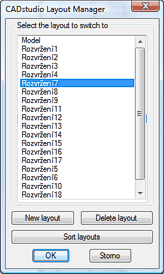
You can use several methods to switch to the individual layout tabs - from mouse-clicks on the tabs, over the Ctrl+PgUp/PgDn keys, up to the LAYOUT command. Download
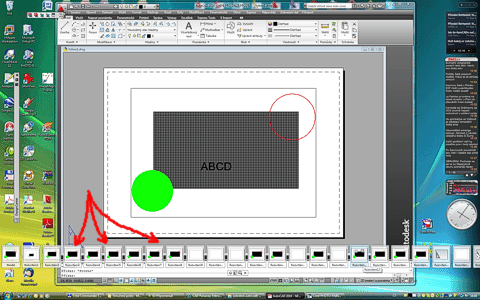
An alternative method is to use visual switching of layouts (using thumbnail preview) which is available since AutoCAD 2009 through the QVLAYOUT command. Especially in drawings with large number of layouts, this semitransparent preview bar can simplify your orientation and make a shorter way to move to the desired layout.
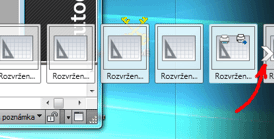
With this command (or with the "Quick view layouts" icon in the statusbar) you can display the panel containing a single row with previews of your layouts. You can anchor this panel using the "pin" icon. With Ctrl+mousewheel you can make the previews smaller. This allows to place even more layout pictures on your screen (they are displayed even outside your AutoCAD window, to the full screen width):
Download
ACAD2018ACAD2010ACAD2009ADTACADMCivil

 *CAD
*CAD
4.9.2009
57342×
this tip shared by ARKANCE experts applies to: AutoCAD 2018 · AutoCAD 2010 · AutoCAD 2009 · ADT · ACADM · Civil ·


CADforum
Tips, tricks, utilities, help, how-tos and FAQ for AutoCAD, LT, Inventor, Revit, Map, Civil 3D, Fusion, Forma, 3ds Max and other Autodesk software (community support by ARKANCE). See About CADforum.
Copyright © 2026 | Advertise with us | Online privacy





