![CAD Forum - tips, tricks, discussion and utilities for AutoCAD, Inventor, Revit and other Autodesk products [www.cadforum.cz]](../common/arkance_186.png "CAD Forum - ARKANCE Community - tips, tricks, discussion and utilities for AutoCAD, Inventor, Revit and other Autodesk products [www.cadforum.cz]")
CAD FORUM - TIPS & TRICKS | UTILITIES | DISCUSSION | BLOCKS | SUPPORT | HELP & ASSISTANCE

 What is the ARKANCE Community?
Over 1.131.000 registered users (EN+CZ).
AutoCAD tips, Inventor tips, Revit tips, Civil tips, Fusion tips.
See the new Beam calculator, Engineering calculator, Tolerances, Spirograph generator and Regression curves in the Converters section.
New AutoCAD 2027 commands and sys.variables

 CAD tip # 6724:
Question
A
With the CADstudio BLegend utility you can easily create a legend (BOM table) of blocks used in your drawing (including icons - thumbnail previews of the blocks).
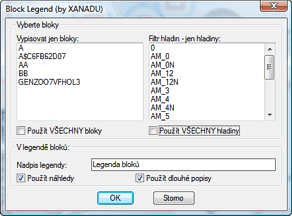
Load the LISP utility with APPLOAD and start it with the BLegend command. Since version 1.1 you can select block names and layers to include in the resulting table. Since version 1.2 you can schedule selected block references only. Then pick the top left corner of the legend table and specify its width. The legend will list all blocks in the current space (model/paper), their names, descriptions (see the block editor) and count. The legend is created in the current table style. You can then customize it (e.g. remove a column).
The labels are created in the current locale language (CZ/EN).
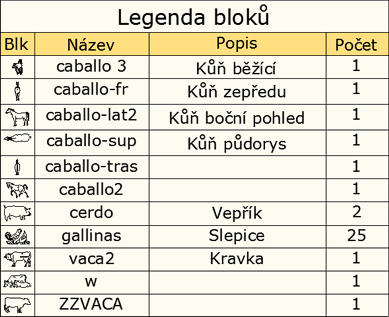
Legend (in Czech) created from the DWG block library Animals
You can download the free BLegend utility from  Download.
ACAD2016ACAD2010ACAD2008ACAD2007ADTMapCivil

 *CAD
*CAD
4.6.2009
45883×
this tip shared by ARKANCE experts applies to: AutoCAD 2016 · AutoCAD 2010 · AutoCAD 2008 · AutoCAD 2007 · ADT · Map · Civil ·


CADforum
Tips, tricks, utilities, help, how-tos and FAQ for AutoCAD, LT, Inventor, Revit, Map, Civil 3D, Fusion, Forma, 3ds Max and other Autodesk software (community support by ARKANCE). See About CADforum.
Copyright © 2026 | Advertise with us | Online privacy





