One of the most requested tasks in an architectural or engineering office is a fast and convenient printout of multiple drawings at the same time, in a specified number of copies and paper formats, and possibly to multiple printers or plotters.
An advantageous method of such "super-batch-print" is using the CAD publishing format DWF (DWFx) with the free application Autodesk Design Review (see Download).
First you have to publish the individual drawings to the DWF format - you can do so from virtually any CAD software (incl. AutoCAD, Inventor and Revit), often you can do so automatically, during any standard save of the drawing file.
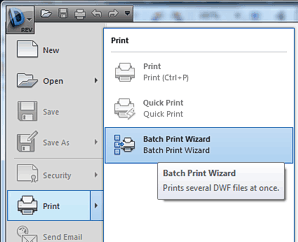
Once you have collected your DWF files, run the Design Review tool and from its application menu ("D-REV") choose Print > Batch Print Wizard:
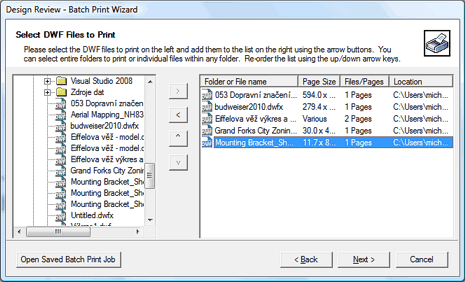
The Batch Print Wizard will lead you through the individual steps of the printing process. In the first step, choose your DWF and DWFX files, that should be batch-printed. Design Review will immediately show their size (format) and the number of sheets in each file:
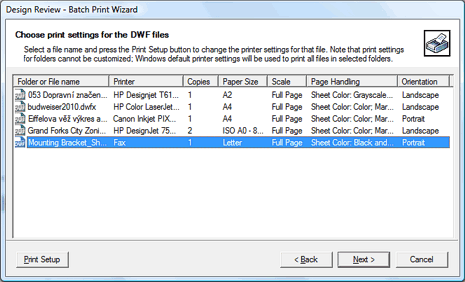
In the next step, you can setup individual print parameters for each CAD file - you can direct them to a specific printer, choose the number of copies for each one, select the paper size (larger drawings will be tiled on smaller sheets), specify scale, color settings (only grayscale, black-and-white) and paper orientation:
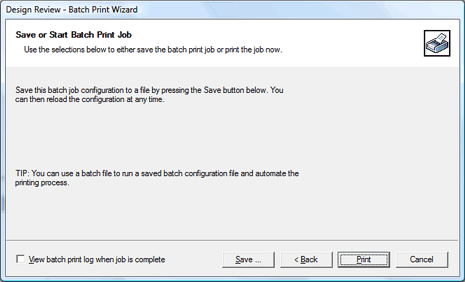
You can finish the print wizard with the "Next" button and start printing with the "Print" button. Please note that the paremeters specified in the batch print wizard can be stored to a definition file .BPJ (batch print job) - you can easily repeat the same job in the future.
You can also run a previously defined batch print job (by the BPJ file) directly from the Windows command line, using the command (example):
"C:\Program Files\Autodesk\Autodesk Design Review\DesignReview.exe" C:\Batches\MyFile.BPJ
resp.
"C:\Program Files (x86)\Autodesk\Autodesk Design Review 2012\DesignReview.exe" \ut\print1.BPJ
![CAD Forum - tips, tricks, discussion and utilities for AutoCAD, Inventor, Revit and other Autodesk products [www.cadforum.cz]](../common/arkance_186.png "CAD Forum - ARKANCE Community - tips, tricks, discussion and utilities for AutoCAD, Inventor, Revit and other Autodesk products [www.cadforum.cz]")

 What is the ARKANCE Community?
 CAD tip # 8425:
 *CAD
*CAD







