![CAD Forum - tips, tricks, discussion and utilities for AutoCAD, Inventor, Revit and other Autodesk products [www.cadforum.cz]](../common/arkance_186.png "CAD Forum - ARKANCE Community - tips, tricks, discussion and utilities for AutoCAD, Inventor, Revit and other Autodesk products [www.cadforum.cz]")
CAD FORUM - TIPS & TRICKS | UTILITIES | DISCUSSION | BLOCKS | SUPPORT | HELP & ASSISTANCE

 What is the ARKANCE Community?
Over 1.124.000 registered users (EN+CZ).
AutoCAD tips, Inventor tips, Revit tips, Civil tips, Fusion tips.
The new Beam calculator, Spirograph generator and Regression curves in the Converters section.
New AutoCAD 2027 commands and sys.variables

 CAD tip # 7662:
Question
A
Autodesk Inventor 2011 (and higher) supports predefined enumeration lists of values for geometrical parameters in 3D part models.
When entering dimensions (parameters) you can choose from a predefined list of allowed values:
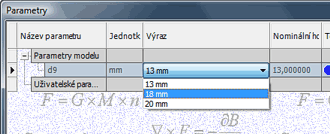
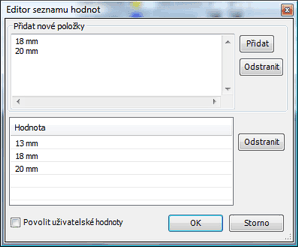
You can setup this list (enumeration) by mouse right-clicking on the respective parameter and choosing the function "Edit multi-value list". So you can add new items to the list of allowed values. You can also enable or disable entering of other, user-specified values:
More options for enumeration lists of predefined allowable values are available in the Inventor iLogic module.
Inventor2011

 *CAD
*CAD
26.11.2010
10542×
this tip shared by ARKANCE experts applies to: Inventor 2011 ·


CADforum
Tips, tricks, utilities, help, how-tos and FAQ for AutoCAD, LT, Inventor, Revit, Map, Civil 3D, Fusion, Forma, 3ds Max and other Autodesk software (community support by ARKANCE). See About CADforum.
Copyright © 2026 | Advertise with us | Online privacy





