![CAD Forum - tips, tricks, discussion and utilities for AutoCAD, Inventor, Revit and other Autodesk products [www.cadforum.cz]](../common/arkance_186.png "CAD Forum - ARKANCE Community - tips, tricks, discussion and utilities for AutoCAD, Inventor, Revit and other Autodesk products [www.cadforum.cz]")

 What is the ARKANCE Community?
 CAD tip # 7193:
Question
You can create the layer list in Excel (CSV - comma-delimited values format), or type it in a text editor. The list can contain either the layer names only, or also their properties - color, linetype, lineweight, plot/noplot, visibility... Possible already existing layers will be redefined with the properties read from the CSV file. Optionally, you can also modify the existing layers, not create new ones.
The requested linetypes must be preloaded or they are autoloaded from the default .LIN file. Colors are supported both from the ACI palette (indexed) or as truecolors (specified as a "(R G B)" triplet). The parameters you don't want to set can be omitted.
You can download the application CsvLayers from  Download. Load it to your AutoCAD or AutoCAD LT with APPLOAD and type the CSVLAYERS command.
An example of the layer definition file:
;CsvLayers sample file
;Expected format:
;LayerName[,Color#[,LineType[,NoPlot(0/1)[,Off(0/1)[,Freeze(0/1)[,Lweight#[,Description[,Transparency#]]]]]]]
;
MyHidden,4,Dashed,1,1,1,25,"This will be hidden,OK?",50
YellowLayer,2,GAS
GreenishLayer,(34 156 27)
Prague
Ceske Budejovice,,,,,,,My hometown
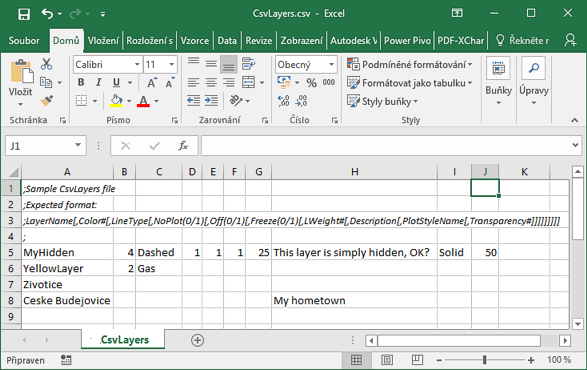
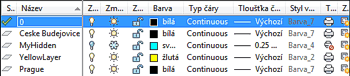
The command LAYERS2CSV can export the CSV layer definition file from your existing drawing. You can then modify the list in Excel and re-import it to your AutoCAD DWG.
You can also use this command pair to copy layer descriptions from one drawing to another one.
Enclose descriptions in double quotes ("") to include commas. You can preset your own delimiter by setting:
(setq _CSVdelimiter ";")
Since version 1.9 you can also import layers with the LISP command (the last parameter is T or nil):
(CSVLAYERES filename createnewlayers?)
so e.g. (CSVLAYERS "C:\\myfolder\\mylayers.csv" T)

 *CAD
*CAD







