![CAD Forum - tips, tricks, discussion and utilities for AutoCAD, Inventor, Revit and other Autodesk products [www.cadforum.cz]](../common/arkance_186.png "CAD Forum - ARKANCE Community - tips, tricks, discussion and utilities for AutoCAD, Inventor, Revit and other Autodesk products [www.cadforum.cz]")
CAD FORUM - TIPS & TRICKS | UTILITIES | DISCUSSION | BLOCKS | SUPPORT | HELP & ASSISTANCE

 What is the ARKANCE Community?
Over 1.124.000 registered users (EN+CZ).
AutoCAD tips, Inventor tips, Revit tips, Civil tips, Fusion tips.
The new Beam calculator, Spirograph generator and Regression curves in the Converters section.
New AutoCAD 2027 commands and sys.variables

 CAD tip # 7177:
Question
A
An automatic background mask is by default offered only for texts. With a simple trick you can invoke the mask functionality and add mask also to block attributes. The size of the mask then automatically and dynamically follows the current contents of the attribute text (value).
In the block editor, start creating a new attribute (ATTDEF).
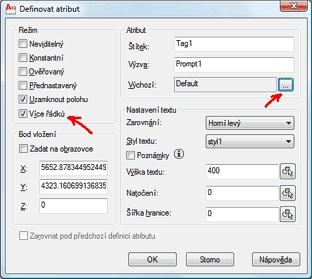
- Check the option "Multiple lines" and click the button "..." to define the default value for the attribute.
- AutoCAD displays a simple text editor. Enter the default text for the attribute and right-click in the editor.
- From the context menu select the function "Background mask" and set its parameters.
- Finish the definition of the attribute (already masked) and save your block definition.
ACAD2010ACAD2009

 *CAD
*CAD
22.1.2010
61978×
this tip shared by ARKANCE experts applies to: AutoCAD 2010 · AutoCAD 2009 ·


CADforum
Tips, tricks, utilities, help, how-tos and FAQ for AutoCAD, LT, Inventor, Revit, Map, Civil 3D, Fusion, Forma, 3ds Max and other Autodesk software (community support by ARKANCE). See About CADforum.
Copyright © 2026 | Advertise with us | Online privacy





