![CAD Forum - tips, tricks, discussion and utilities for AutoCAD, Inventor, Revit and other Autodesk products [www.cadforum.cz]](../common/arkance_186.png "CAD Forum - ARKANCE Community - tips, tricks, discussion and utilities for AutoCAD, Inventor, Revit and other Autodesk products [www.cadforum.cz]")
CAD FORUM - TIPS & TRICKS | UTILITIES | DISCUSSION | BLOCKS | SUPPORT | HELP & ASSISTANCE

 What is the ARKANCE Community?
Over 1.124.000 registered users (EN+CZ).
AutoCAD tips, Inventor tips, Revit tips, Civil tips, Fusion tips.
The new Beam calculator, Spirograph generator and Regression curves in the Converters section.
New AutoCAD 2027 commands and sys.variables

 CAD tip # 2021:
Question
A
AutoCAD cannot dimension length of polyline, arc or spline by default. But you can use the LiveLabel utility (www.cadstudio.cz/livelabel) or DimCurve (see below), which can make an associative link between polyline length and its dimension.
As an example - draw an arbitrary spline, attach a standard horizontal dimension to its endpoints. The dimension displays only a direct distance of the endpoints, not its lenght. Using LiveLabel commands define a link style "Length-DimText" and link your curve with the dimension. Now the dimension already displays true length of the spline and if you edit it (e.g. using grip edit) the dimension is updated automatically.
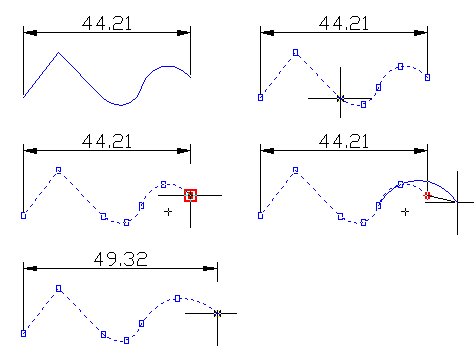
In higher AutoCAD versions you can use the text fields with properties (length) of the selected drawing object.
You can also use a newer, more advance tool for curve dimensioning in AutoCAD - DimCurve.
ACAD2002ACAD2004ACAD2006ADTMapMDT

 *CAD
*CAD
6.3.2002
26573×
this tip shared by ARKANCE experts applies to: AutoCAD 2002 · AutoCAD 2004 · AutoCAD 2006 · AutoCAD Architecture · AutoCAD Map 3D · MDT ·


CADforum
Tips, tricks, utilities, help, how-tos and FAQ for AutoCAD, LT, Inventor, Revit, Map, Civil 3D, Fusion, Forma, 3ds Max and other Autodesk software (community support by ARKANCE). See About CADforum.
Copyright © 2026 | Advertise with us | Online privacy





