![CAD Forum - tips, tricks, discussion and utilities for AutoCAD, Inventor, Revit and other Autodesk products [www.cadforum.cz]](../common/arkance_186.png "CAD Forum - ARKANCE Community - tips, tricks, discussion and utilities for AutoCAD, Inventor, Revit and other Autodesk products [www.cadforum.cz]")
CAD FORUM - TIPS & TRICKS | UTILITIES | DISCUSSION | BLOCKS | SUPPORT | HELP & ASSISTANCE

 What is the ARKANCE Community?
Over 1.124.000 registered users (EN+CZ).
AutoCAD tips, Inventor tips, Revit tips, Civil tips, Fusion tips.
The new Beam calculator, Spirograph generator and Regression curves in the Converters section.
New AutoCAD 2027 commands and sys.variables

 CAD tip # 9020:
Question
A
You can use multiple methods to measure distance of two points in a drawing in AutoCAD Map 3D or Civil 3D. These methods may (properly) give different results - so you need to choose the right method suitable for the given situation.
Let us assume a DWG drawing of a map (here a thematic road map near Prague) with an assigned coordinate system, measured points with unequal elevations (Z) and an active osnap mode.
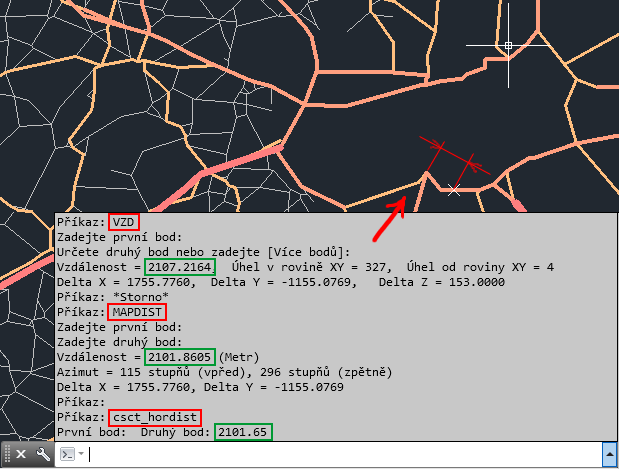
The most simple command - DIST (or MEASUREGEOM) - lists the spatial (3D) distance of both points - here: 2107.2164 m.
The mapping command for measuring distances - MAPDIST - respects the assigned coordinate system and measures the distance on the surface of the current geoid (Earth curvature) - here: 2101.8605 m.
The add-on command csct_hordist ("Distance in 2D") from Civil Tools lists the plain 2D distance of the given points, i.e. their distance in the plan view, in XY projection - this distance is the shortest one from the three, 2101.65 m.
MapCivil

 *CAD
*CAD
10.1.2013
22639×
this tip shared by ARKANCE experts applies to: AutoCAD Map 3D · Civil 3D ·


CADforum
Tips, tricks, utilities, help, how-tos and FAQ for AutoCAD, LT, Inventor, Revit, Map, Civil 3D, Fusion, Forma, 3ds Max and other Autodesk software (community support by ARKANCE). See About CADforum.
Copyright © 2026 | Advertise with us | Online privacy





