![CAD Forum - tips, tricks, discussion and utilities for AutoCAD, Inventor, Revit and other Autodesk products [www.cadforum.cz]](../common/arkance_186.png "CAD Forum - ARKANCE Community - tips, tricks, discussion and utilities for AutoCAD, Inventor, Revit and other Autodesk products [www.cadforum.cz]")
CAD FORUM - TIPS & TRICKS | UTILITIES | DISCUSSION | BLOCKS | SUPPORT | HELP & ASSISTANCE

 What is the ARKANCE Community?
Over 1.134.000 registered users (EN+CZ).
AutoCAD tips, Inventor tips, Revit tips, Civil tips, Fusion tips.
See the new Beam calculator, Engineering calculator, Tolerances, Spirograph generator and Regression curves in the Converters section.
New AutoCAD 2027 commands and sys.variables

 CAD tip # 5707:
Question
A
Inventor 2008 brings a new functionality allowing to define multi-character command aliases and use them to start commands instead of using mouse and tool panels.
To enable predefined command aliases set the option "Use default multi-character Command Aliases" on the Keyboard tab of the Customize dialog (Tools > Customize). Here you can also add your own aliases.
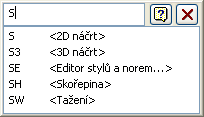
Entered aliases are displayed (in red) in your Inventor statusline. But you can also enable something like an Inventor "commandline" and enter the aliases in this window. You can find this "commandline" option ("Show command alias input dialog") on the General tab of the "Application options" dialog (Tools > Application options, OP).
In this command window you can see the list of commands matching the entered characters of the alias:
Inventor2008

 *CAD
*CAD
14.8.2007
25065×
this tip shared by ARKANCE experts applies to: Inventor 2008 ·


CADforum
Tips, tricks, utilities, help, how-tos and FAQ for AutoCAD, LT, Inventor, Revit, Map, Civil 3D, Fusion, Forma, 3ds Max and other Autodesk software (community support by ARKANCE). See About CADforum.
Copyright © 2026 | Advertise with us | Online privacy





