![CAD Forum - tips, tricks, discussion and utilities for AutoCAD, Inventor, Revit and other Autodesk products [www.cadforum.cz]](../common/arkance_186.png "CAD Forum - ARKANCE Community - tips, tricks, discussion and utilities for AutoCAD, Inventor, Revit and other Autodesk products [www.cadforum.cz]")
CAD FORUM - TIPS & TRICKS | UTILITIES | DISCUSSION | BLOCKS | SUPPORT | HELP & ASSISTANCE

 What is the ARKANCE Community?
Over 1.134.000 registered users (EN+CZ).
AutoCAD tips, Inventor tips, Revit tips, Civil tips, Fusion tips.
See the new Beam calculator, Engineering calculator, Tolerances, Spirograph generator and Regression curves in the Converters section.
New AutoCAD 2027 commands and sys.variables

 CAD tip # 9348:
Question
A
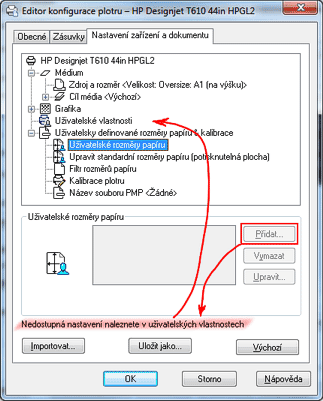
Your "Plotter Configuration Editor" may display the "Add" option for "Custom Paper Sizes" as inactive (grayed, disabled) and you cannot add your own new custom paper sizes. This is caused by using a system printer or by insufficient access (edit) rights on the curent .PC3, resp. .PMP file.
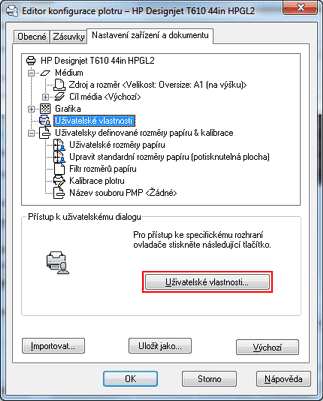
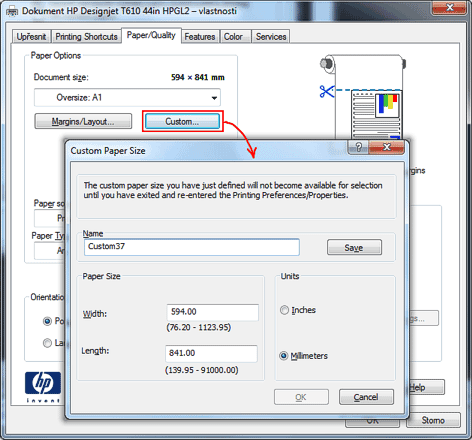
Adding custom paper sizes inside AutoCAD is supported only on AutoCAD printer drivers (e.g. for PDF, raster images...), not on system printers. Most modern plotter drivers (e.g. HP Designjet) are in fact AutoCAD-optimized system printers. Their settings (incl. adding paper sizes) have to be performed in Windows Control Panels.
The "Device settings" dialog in AutoCAD prompts to use this way. The disabled (inactive) button "Add" displays a note to use "Custom properties":
ACADACLTADTCivilACADMMapDWG

 *CAD
*CAD
19.7.2013
47751×


CADforum
Tips, tricks, utilities, help, how-tos and FAQ for AutoCAD, LT, Inventor, Revit, Map, Civil 3D, Fusion, Forma, 3ds Max and other Autodesk software (community support by ARKANCE). See About CADforum.
Copyright © 2026 | Advertise with us | Online privacy





