![CAD Forum - tips, tricks, discussion and utilities for AutoCAD, Inventor, Revit and other Autodesk products [www.cadforum.cz]](../common/arkance_186.png "CAD Forum - ARKANCE Community - tips, tricks, discussion and utilities for AutoCAD, Inventor, Revit and other Autodesk products [www.cadforum.cz]")
CAD FORUM - TIPS & TRICKS | UTILITIES | DISCUSSION | BLOCKS | SUPPORT | HELP & ASSISTANCE

 What is the ARKANCE Community?
Over 1.134.000 registered users (EN+CZ).
AutoCAD tips, Inventor tips, Revit tips, Civil tips, Fusion tips.
See the new Beam calculator, Engineering calculator, Tolerances, Spirograph generator and Regression curves in the Converters section.
New AutoCAD 2027 commands and sys.variables

 CAD tip # 10499:
Question
A
How to fillet a touching edge (intersection line) between two 3D solid bodies? The standard command FILLET can fillet an edge of a single solid but not an intersection edge between solids.
Before filleting, you need to union both solids into one - with the command UNION.
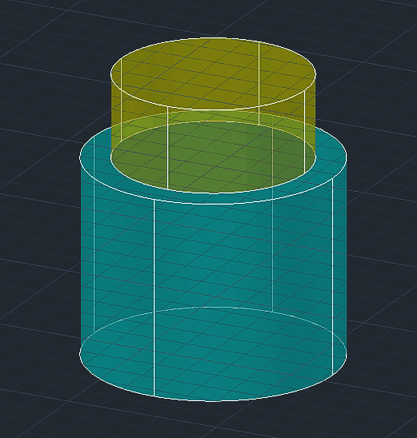
Then you can use the FILLET command - select the unioned solid through the edge you want to fillet and specify the fillet radius.
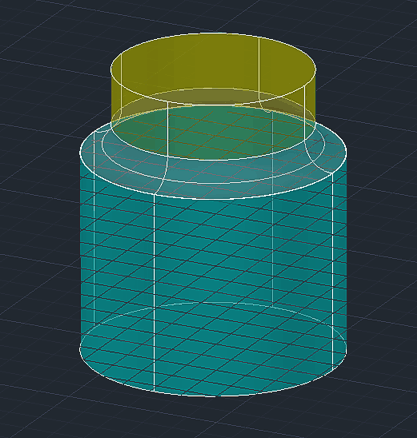
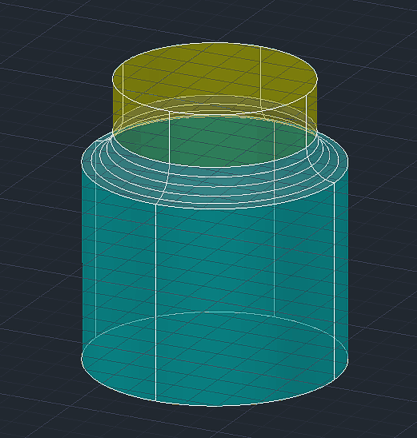
Another option is to use the FILLETEDGE command available since version 2011 - here you can again just select the edge or loop to fillet and specify the radius:
ACAD

 *CAD
*CAD
16.9.2015
24051×
this tip shared by ARKANCE experts applies to: ACAD ·


CADforum
Tips, tricks, utilities, help, how-tos and FAQ for AutoCAD, LT, Inventor, Revit, Map, Civil 3D, Fusion, Forma, 3ds Max and other Autodesk software (community support by ARKANCE). See About CADforum.
Copyright © 2026 | Advertise with us | Online privacy





