![CAD Forum - tips, tricks, discussion and utilities for AutoCAD, Inventor, Revit and other Autodesk products [www.cadforum.cz]](../common/arkance_186.png "CAD Forum - ARKANCE Community - tips, tricks, discussion and utilities for AutoCAD, Inventor, Revit and other Autodesk products [www.cadforum.cz]")
CAD FORUM - TIPS & TRICKS | UTILITIES | DISCUSSION | BLOCKS | SUPPORT | HELP & ASSISTANCE

 What is the ARKANCE Community?
Over 1.130.000 registered users (EN+CZ).
AutoCAD tips, Inventor tips, Revit tips, Civil tips, Fusion tips.
The new Beam calculator, Tolerances, Spirograph generator and Regression curves in the Converters section.
New AutoCAD 2027 commands and sys.variables

 CAD tip # 6896:
Question
A
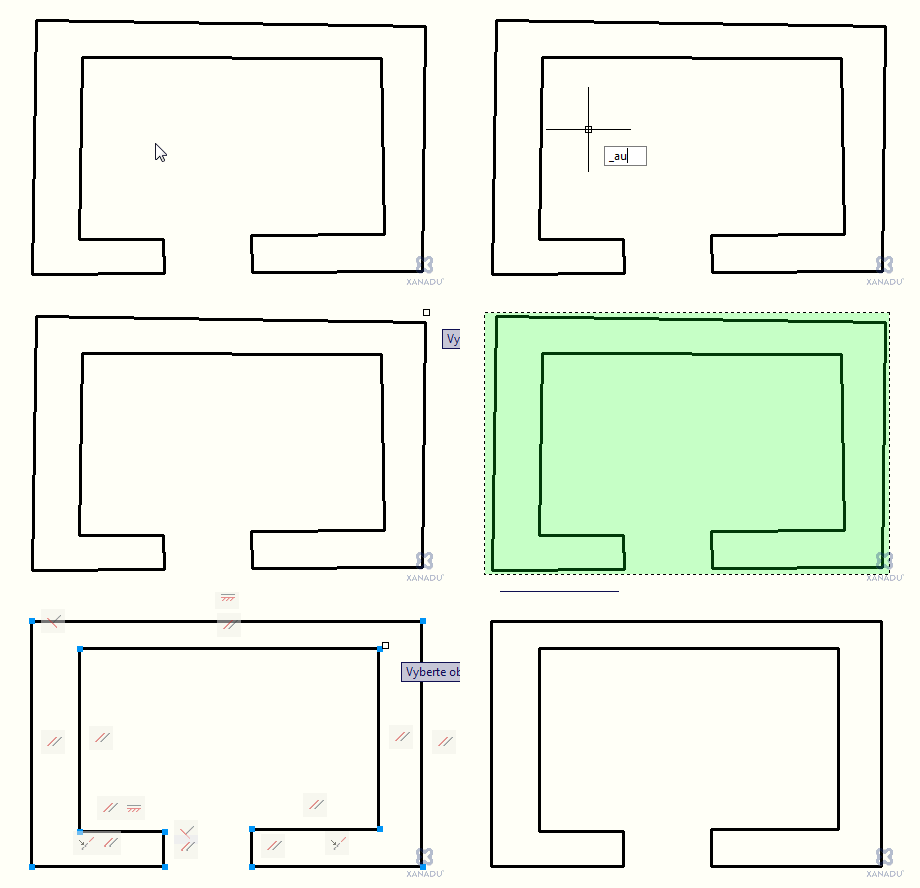
You can use AutoCAD geometric constraints to clean-up your inaccurately sketched drawings. If your lines are not exactly parallel or not exactly perpendicular, horizontal or vertical, you can "magically" rectify them with a single command.
Use the AUTOCONSTRAIN command to automatically add geometric constraints to your drawing. If you want the constraints just for the clean-up, remove them afterwards with the DELCONSTRAINT command - the geometry will stay corrected.
ACAD2010ADT2010ACADM2010Map2010

 *CAD
*CAD
31.8.2009
14732×
this tip shared by ARKANCE experts applies to: AutoCAD 2010 · AutoCAD Architecture 2010 · AutoCAD Mechanical 2010 · AutoCAD Map 3D 2010 ·


CADforum
Tips, tricks, utilities, help, how-tos and FAQ for AutoCAD, LT, Inventor, Revit, Map, Civil 3D, Fusion, Forma, 3ds Max and other Autodesk software (community support by ARKANCE). See About CADforum.
Copyright © 2026 | Advertise with us | Online privacy





