CAD Forum - tips, tricks, discussion and utilities for AutoCAD, Inventor, Revit and other Autodesk products [www.cadforum.cz] ARKANCE | CONTACT - CZ | SK | EN | DE

CAD tip CAD tip # 12638:

Question

CAD 
 %  platform  category 
A
Autodesk Fusion 360 in its parametric modeler does not allow (unlike Inventor) to work directly with IF-type conditions - i.e. set values of the dimensional or count parameters dependent on a specific condition is met for a given parameter.

But you can still perform a number of modeling operations based on a condition using workarounds - employing a respective math function. E.g. the functions max or min can compare values of two parameters or a value of a parameter against a constant number. The function sign will detect if the result of an operation - e.g. again a comparison by subtracting two values - is positive (1) or negative (0). With a proper combination of these functions you can build the required conditional expression. Do not forget to ensure consistency of units in your expression.
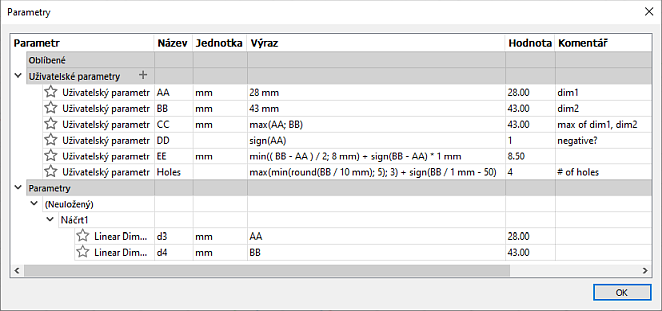
E.g. the parameter "number of holes" (Holes) in this example is preset as conditional, depending on the current value of the dimensional parameter "BB":

max(min(round(BB / 10 mm); 5); 3) + sign(BB / 1 mm - 50)

This expression means, that if the dimensional value of BB is lower than 35, the number of holes will be 3, from the length of 35 up to 45 mm the number of holes will increase to 4, if the length exceeds 45 mm, there will be 5 holes and for all lengths above 50 mm, the number of holes will be 6.

Another option is using the programming interface, the Fusion 360 API.

Fusion360
100% *CAD
11.6.2020   23204×  
   
this tip shared by ARKANCE experts applies to: Fusion 360 ·

See also:
Tip 14864:How to generate a spirograph curve, guilloche, for CAD applications?
Tip 14770:Volumetric textures in Autodesk Fusion.
Tip 14767:How do I model a thread in Fusion that is not listed?
Tip 14721:Pixel fonts and "cube" styled texts in Fusion.
Tip 14714:Why is Fusion suddenly putting apostrophes in my text?


Back    All CAD Tips


Have we helped you? If you want to support the CAD Forum web service, consider buying one of our CAD applications, or our custom software development offerings, or donating via PayPal (see above). You may also add a link to your web - like this "fan" link: CAD Forum - tips, utilities, blocks for Autodesk products
CAD: 
OS: 
Categ: 
Text:
 FAQ


Featuring:
Increase your productivity with our set of BIM add-on functions for Autodesk Revit
Be.Smart T4R More info


Please use these tips at your own risk.
ARKANCE is not responsible for possible problems that may occur as a result of using any of these tips.
TOPlist