![CAD Forum - tips, tricks, discussion and utilities for AutoCAD, Inventor, Revit and other Autodesk products [www.cadforum.cz]](../common/arkance_186.png "CAD Forum - ARKANCE Community - tips, tricks, discussion and utilities for AutoCAD, Inventor, Revit and other Autodesk products [www.cadforum.cz]")
CAD FORUM - TIPS & TRICKS | UTILITIES | DISCUSSION | BLOCKS | SUPPORT | HELP & ASSISTANCE

 What is the ARKANCE Community?
Over 1.130.000 registered users (EN+CZ).
AutoCAD tips, Inventor tips, Revit tips, Civil tips, Fusion tips.
The new Beam calculator, Tolerances, Spirograph generator and Regression curves in the Converters section.
New AutoCAD 2027 commands and sys.variables

 CAD tip # 10274:
Question
A
When the installation process "Streamer.exe" in Autodesk Fusion 360 fails or when it is aborted manually, the system may get to a state where all future attempts to update the application reports errors "update in progress" or "database is locked" and attempts to uninstall or reinstall the new version report "unable to install at this time".
Download the installation program "Fusion 360 Client Downloader.exe" from the Fusion 360 download page and run this program in the command window with the parameter "--quiet", i.e.:
"Fusion 360 Client Downloader.exe" --quiet
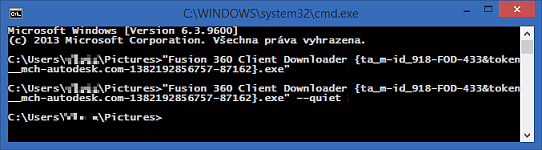
This "quiet" installation will reinstall your current version without any prompts and error checks. You can find when this quiet installation is completed only from the presence (or rather absence) of the process "Streamer.exe" in the Windows Task Manager.
Fusion360

 *CAD
*CAD
12.4.2015
15279×
this tip shared by ARKANCE experts applies to: Fusion 360 ·


CADforum
Tips, tricks, utilities, help, how-tos and FAQ for AutoCAD, LT, Inventor, Revit, Map, Civil 3D, Fusion, Forma, 3ds Max and other Autodesk software (community support by ARKANCE). See About CADforum.
Copyright © 2026 | Advertise with us | Online privacy





