![CAD Forum - tips, tricks, discussion and utilities for AutoCAD, Inventor, Revit and other Autodesk products [www.cadforum.cz]](../common/arkance_186.png "CAD Forum - ARKANCE Community - tips, tricks, discussion and utilities for AutoCAD, Inventor, Revit and other Autodesk products [www.cadforum.cz]")
CAD FORUM - TIPS & TRICKS | UTILITIES | DISCUSSION | BLOCKS | SUPPORT | HELP & ASSISTANCE

 What is the ARKANCE Community?
Over 1.133.000 registered users (EN+CZ).
AutoCAD tips, Inventor tips, Revit tips, Civil tips, Fusion tips.
See the new Beam calculator, Engineering calculator, Tolerances, Spirograph generator and Regression curves in the Converters section.
New AutoCAD 2027 commands and sys.variables

 CAD tip # 7867:
Question
A
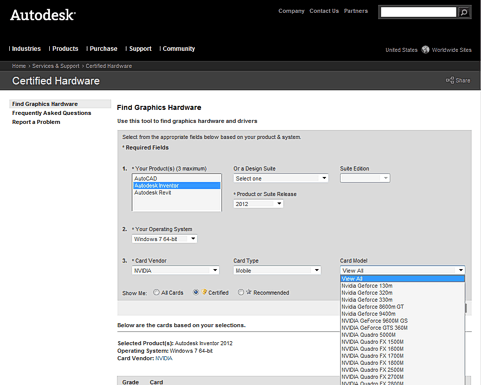
Autodesk offers an online tool for selection of recommended and certified graphics cards for AutoCAD (2013, 2012, and older), Inventor (2013, 2012 and older), Revit (2013, 2012 and older) and their "Design Suites".
Yoz can find the most suitable graphics card for your CAD software and for your operating system using the web page Graphics Hardware.
The non-certified graphics cards (and notebook chipsets; plus drivers) may not support all graphic functions in your CAD application!
ACAD2019ACAD2013ACAD2012Inv2012Revit2012

 *CAD
*CAD
27.3.2011
38832×
this tip shared by ARKANCE experts applies to: AutoCAD 2019 · AutoCAD 2013 · AutoCAD 2012 · Inventor 2012 · Revit 2012 ·


CADforum
Tips, tricks, utilities, help, how-tos and FAQ for AutoCAD, LT, Inventor, Revit, Map, Civil 3D, Fusion, Forma, 3ds Max and other Autodesk software (community support by ARKANCE). See About CADforum.
Copyright © 2026 | Advertise with us | Online privacy





