
CAD discussion forum - ask any CAD-related questions here, share your CAD knowledge on AutoCAD, Inventor, Revit and other Autodesk software with your peers from all over the world. To start a new topic, choose an appropriate forum.
Please abide by the
rules of this forum.
This is a peer-to-peer forum. The forum doesn't replace the official direct technical support provided by ARKANCE for its customers.
How to post questions: register or login, go to the specific forum and click the NEW TOPIC button.
| Author |
 Topic Search Topic Search  Topic Options Topic Options
|
basusumana 
Newbie

Joined: 11.Mar.2020
Location: United Kingdom
Using: AutoCad LT2020
Status: Offline
Points: 13
|
 Topic: Coordinate Extraction Topic: Coordinate Extraction
Posted: 11.Mar.2020 at 12:59 |
Hi,
I have AutoCad LT 2020 version. I have have just bought LT extension and installed it in my system. I want to extract coordinates of the objects from one of my layer. Is there any way by which I can extract coordinates using LT extension?
Thank you, Sumana
|
|
Sumana Basu
Geophysicist
Brimstone Site Investigation
|
 |
Vladimir Michl
Moderator Group

Joined: 26.Jul.2007
Location: Czech Republic
Using: Autodesk software
Status: Offline
Points: 2196
|
Posted: 11.Mar.2020 at 13:04 |
|
Yes, you can use the function "Report coordinates" in the Tools/Utilities section.
Edited by Vladimir Michl - 11.Mar.2020 at 13:14
|
|
|
|
basusumana
Newbie
Joined: 11.Mar.2020
Location: United Kingdom
Using: AutoCad LT2020
Status: Offline
Points: 13
|
Posted: 11.Mar.2020 at 13:09 |
Hi Vladimir,
Thank you for the prompt reply. Could you please let me know which button is report coordinates? I can find 'report lengths' but there is no 'report coordinate' in the LT extension menu bar.
Thank you, Sumana
|
|
Sumana Basu
Geophysicist
Brimstone Site Investigation
|
|
Vladimir Michl
Moderator Group
Joined: 26.Jul.2007
Location: Czech Republic
Using: Autodesk software
Status: Offline
Points: 2196
|
Posted: 11.Mar.2020 at 13:13 |
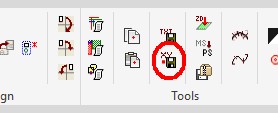
I don't know if you are using the toolbar or ribbon menu but this is the proper ribbon button:
the objects must be either POINT, SHAPE, INSERT, or PLINE
Edited by Vladimir Michl - 11.Mar.2020 at 13:17
|
|
|
|
basusumana
Newbie
Joined: 11.Mar.2020
Location: United Kingdom
Using: AutoCad LT2020
Status: Offline
Points: 13
|
Posted: 11.Mar.2020 at 13:39 |
Hi Vladimir,
Thank you  . Got it. . Got it. But I am still facing problem. The coordinates being extracted are all zero.
Thank you, Sumana
|
|
Sumana Basu
Geophysicist
Brimstone Site Investigation
|
|
Vladimir Michl
Moderator Group
Joined: 26.Jul.2007
Location: Czech Republic
Using: Autodesk software
Status: Offline
Points: 2196
|
Posted: 11.Mar.2020 at 13:56 |
|
What type of objects are you selecting? Is the drawing metric or imperial?
|
|
|
|
basusumana
Newbie
Joined: 11.Mar.2020
Location: United Kingdom
Using: AutoCad LT2020
Status: Offline
Points: 13
|
Posted: 11.Mar.2020 at 13:59 |
|
The coordinates are in mm.
|
|
Sumana Basu
Geophysicist
Brimstone Site Investigation
|
|
Vladimir Michl
Moderator Group
Joined: 26.Jul.2007
Location: Czech Republic
Using: Autodesk software
Status: Offline
Points: 2196
|
Posted: 11.Mar.2020 at 14:02 |
|
That is strange. I have retested it now in LT 2020, with block references (INSERTs) and it exports their ref.points coordinates properly.
|
|
|
|
basusumana
Newbie
Joined: 11.Mar.2020
Location: United Kingdom
Using: AutoCad LT2020
Status: Offline
Points: 13
|
Posted: 11.Mar.2020 at 14:03 |
|
Objects are circles drawn in a layer. I need to extract the coordinate at the centre point of each circles.
|
|
Sumana Basu
Geophysicist
Brimstone Site Investigation
|
|
basusumana
Newbie
Joined: 11.Mar.2020
Location: United Kingdom
Using: AutoCad LT2020
Status: Offline
Points: 13
|
Posted: 11.Mar.2020 at 14:12 |
I have attached one of the dwg file from which I was trying to extract corordinate.
Please have a look.
Thank you, Sumana
|
|
Sumana Basu
Geophysicist
Brimstone Site Investigation
|
|
![CAD Forum - tips, tricks, discussion and utilities for AutoCAD, Inventor, Revit and other Autodesk products [www.cadforum.cz]](/common/arkance_186.png "CAD Forum - ARKANCE Community - tips, tricks, discussion and utilities for AutoCAD, Inventor, Revit and other Autodesk products [www.cadforum.cz]")



 Discussion forum


 Coordinate Extraction
 Tweet
Tweet







