![CAD Forum - tips, tricks, discussion and utilities for AutoCAD, Inventor, Revit and other Autodesk products [www.cadforum.cz]](../common/arkance_186.png "CAD Forum - ARKANCE Community - tips, tricks, discussion and utilities for AutoCAD, Inventor, Revit and other Autodesk products [www.cadforum.cz]")
CAD FORUM - TIPS & TRICKS | UTILITIES | DISCUSSION | BLOCKS | SUPPORT | HELP & ASSISTANCE

 What is the ARKANCE Community?
Over 1.134.000 registered users (EN+CZ).
AutoCAD tips, Inventor tips, Revit tips, Civil tips, Fusion tips.
See the new Beam calculator, Engineering calculator, Tolerances, Spirograph generator and Regression curves in the Converters section.
New AutoCAD 2027 commands and sys.variables

 CAD tip # 10582:
Question
A
If you have to edit a text in Revit (e.g. in a drawing view) and the edited text is too small and illegible in the current view size, you don't need to change the view and zoom in.
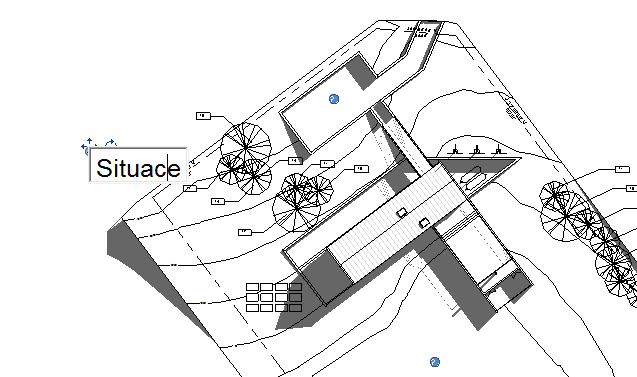
Just roll your mouse scroll wheel during editing while holding the Ctrl key. The edited text will be zoomed in (enlarged) to a legible size. When you finish editing, it will of course return to its former (true) size.
To illustrate this - do you prefer to edit your texts this way?
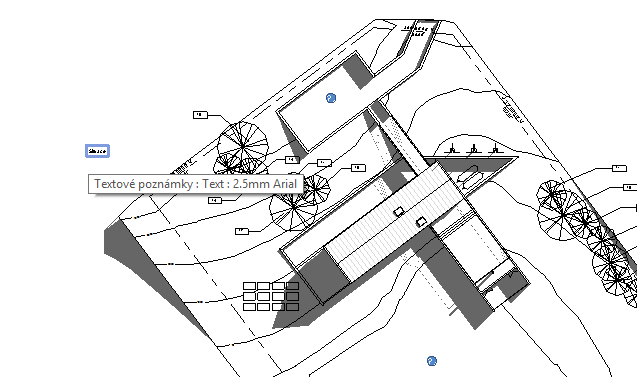
Or rather this way?
Revit

 *CAD
*CAD
12.11.2015
14664×
this tip shared by ARKANCE experts applies to: Revit ·


CADforum
Tips, tricks, utilities, help, how-tos and FAQ for AutoCAD, LT, Inventor, Revit, Map, Civil 3D, Fusion, Forma, 3ds Max and other Autodesk software (community support by ARKANCE). See About CADforum.
Copyright © 2026 | Advertise with us | Online privacy





