![CAD Forum - tips, tricks, discussion and utilities for AutoCAD, Inventor, Revit and other Autodesk products [www.cadforum.cz]](../common/arkance_186.png "CAD Forum - ARKANCE Community - tips, tricks, discussion and utilities for AutoCAD, Inventor, Revit and other Autodesk products [www.cadforum.cz]")
CAD FORUM - TIPS & TRICKS | UTILITIES | DISCUSSION | BLOCKS | SUPPORT | HELP & ASSISTANCE

 What is the ARKANCE Community?
Over 1.122.000 registered users (EN+CZ).
AutoCAD tips, Inventor tips, Revit tips, Civil tips, Fusion tips.
The new Beam calculator, Spirograph generator and Regression curves in the Converters section.
New AutoCAD 2027 commands and sys.variables

 CAD tip # 12287:
Question
A
When hatching large, especially long objects using the flood-fill method - i.e. with the option "Specify internal point:" - you may encounter the problem that some boundary lines are not honored. See the pink part of the flood solid hatch:
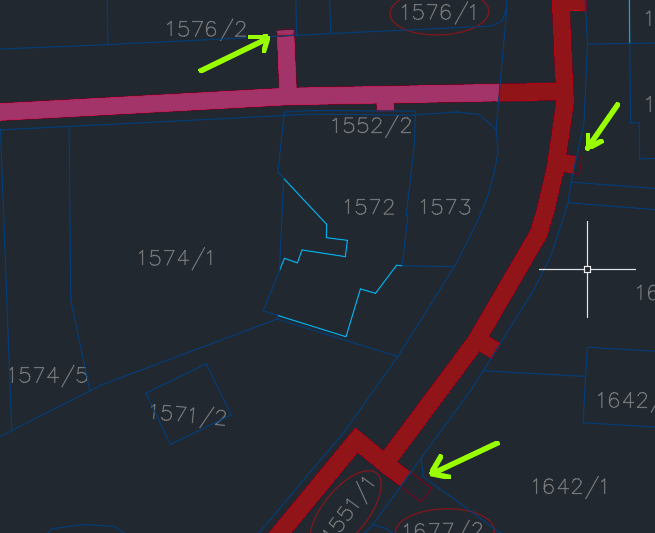
There are multiple solutions:
- Instead of the internal point method, perform the hatching using the boundary (object) selection method.
- Split the long object into shorter ones using auxiliary "partition" lines and hatch them one by one.
- Instead of using objects "on screen", force your AutoCAD to work with a specified set of potential hatch boundaries. You can do it this way: in the HATCH command, choose the fill type and then use the option "seTtings". Expand the dialog with the bottom right arrow, click on "Boundary set > New" and use window selection (or step by step selections, or just ALL - but watch any switched-off layers) to select objects along the hatched area - e.g. a buffer-zone. Then zoom in closer as necessary and click the point inside the zone.
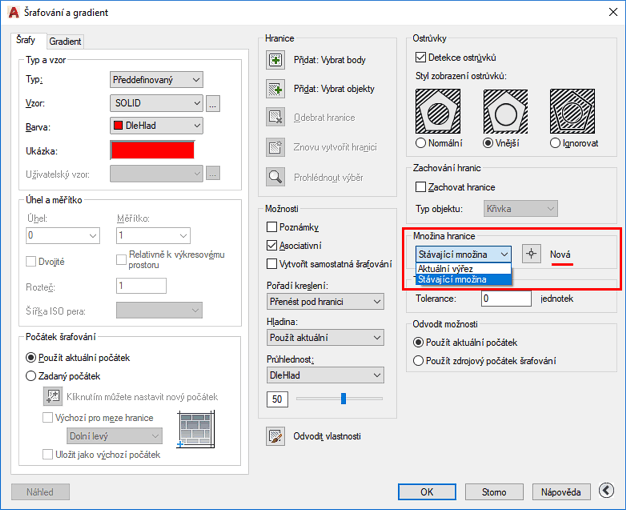
You can predefine this procedure to a LISP function or a menu macro - and then assign it e.g. to a ribbon icon or to a keyboard shortcut.
The LISP function (a new command "FHATCH") can e.g. look like this:
(defun C:FHATCH ()
 (setvar "HPNAME" "SOLID")
 (command "_-HATCH" "_Adv" "_Bound" "_New" "_ALL" "" "")
)
The menu macro (a new command in CUI, also for LT) can look like e.g. this:
^C^C_-HATCH;_Adv;_Bound;_New;_ALL;;;
ACADACLTCivilMapADT

 *CAD
*CAD
25.6.2019
37411×
this tip shared by ARKANCE experts applies to: AutoCAD · AutoCAD LT · Civil 3D · AutoCAD Map 3D · AutoCAD Architecture ·


CADforum
Tips, tricks, utilities, help, how-tos and FAQ for AutoCAD, LT, Inventor, Revit, Map, Civil 3D, Fusion, Forma, 3ds Max and other Autodesk software (community support by ARKANCE). See About CADforum.
Copyright © 2026 | Advertise with us | Online privacy





