![CAD Forum - tips, tricks, discussion and utilities for AutoCAD, Inventor, Revit and other Autodesk products [www.cadforum.cz]](../common/arkance_186.png "CAD Forum - ARKANCE Community - tips, tricks, discussion and utilities for AutoCAD, Inventor, Revit and other Autodesk products [www.cadforum.cz]")
CAD FORUM - TIPS & TRICKS | UTILITIES | DISCUSSION | BLOCKS | SUPPORT | HELP & ASSISTANCE

 What is the ARKANCE Community?
Over 1.133.000 registered users (EN+CZ).
AutoCAD tips, Inventor tips, Revit tips, Civil tips, Fusion tips.
See the new Beam calculator, Engineering calculator, Tolerances, Spirograph generator and Regression curves in the Converters section.
New AutoCAD 2027 commands and sys.variables

 CAD tip # 9882:
Question
A
If you don't want to install (or want to remove after the installation) web functions of the Autodesk 360 cloud in AutoCADu, uncheck the option "Autodesk 360" in custom installation or in installation changes.
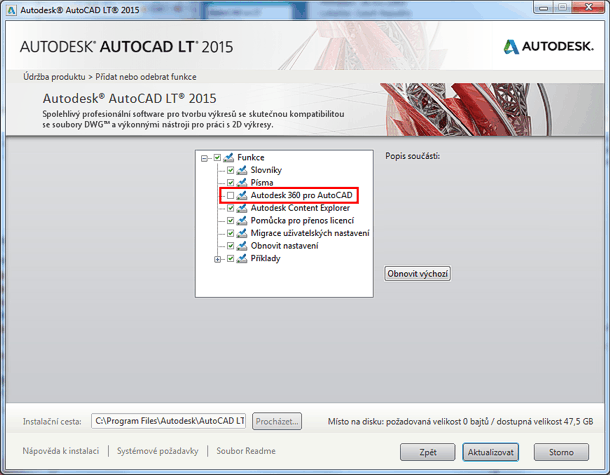
Make sure you have the latest AutoCAD updates installed, otherwise AutoCAD may suffer the "empty properties palette" bug after the uninstall of A360.
You may also need to uninstall the system component "Autodesk 360" (see Windows taskbar), or Autodesk Sync in older versions.
ACAD2015ACAD2014ACAD2013ACLTADTCivil

 *CAD
*CAD
21.6.2014
26396×
this tip shared by ARKANCE experts applies to: AutoCAD 2015 · AutoCAD 2014 · AutoCAD 2013 · ACLT · ADT · Civil ·


CADforum
Tips, tricks, utilities, help, how-tos and FAQ for AutoCAD, LT, Inventor, Revit, Map, Civil 3D, Fusion, Forma, 3ds Max and other Autodesk software (community support by ARKANCE). See About CADforum.
Copyright © 2026 | Advertise with us | Online privacy





