![CAD Forum - tips, tricks, discussion and utilities for AutoCAD, Inventor, Revit and other Autodesk products [www.cadforum.cz]](../common/arkance_186.png "CAD Forum - ARKANCE Community - tips, tricks, discussion and utilities for AutoCAD, Inventor, Revit and other Autodesk products [www.cadforum.cz]")
CAD FORUM - TIPS & TRICKS | UTILITIES | DISCUSSION | BLOCKS | SUPPORT | HELP & ASSISTANCE

 What is the ARKANCE Community?
Over 1.124.000 registered users (EN+CZ).
AutoCAD tips, Inventor tips, Revit tips, Civil tips, Fusion tips.
The new Beam calculator, Spirograph generator and Regression curves in the Converters section.
New AutoCAD 2027 commands and sys.variables

 CAD tip # 11226:
Question
A
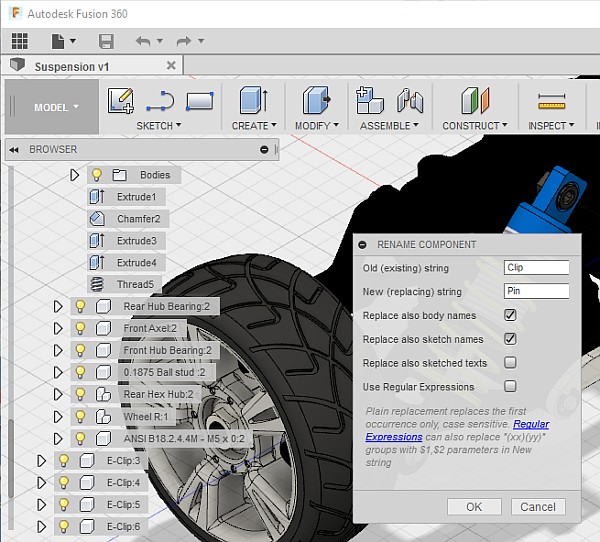
With the free add-on script "RenameComp" (see), you can easily rename components, bodies and sketches in your Fusion 360 designs.
Download the tool from  Download and copy it to your folder C:\Users\USERNAME\AppData\Roaming\Autodesk\Autodesk Fusion 360\API\Scripts\. Then press Shift+S and run the RenameComp script.
The option Regular expressions allows to perform complex replacements in the names of your browser tree. RegEx replacements are case-insensitive, plain search-replace is case sensitive and replaces only the first occurrence of the old string.
Fusion360

 *CAD
*CAD
18.12.2016
14720×
this tip shared by ARKANCE experts applies to: Fusion 360 ·


CADforum
Tips, tricks, utilities, help, how-tos and FAQ for AutoCAD, LT, Inventor, Revit, Map, Civil 3D, Fusion, Forma, 3ds Max and other Autodesk software (community support by ARKANCE). See About CADforum.
Copyright © 2026 | Advertise with us | Online privacy





