![CAD Forum - tips, tricks, discussion and utilities for AutoCAD, Inventor, Revit and other Autodesk products [www.cadforum.cz]](../common/arkance_186.png "CAD Forum - ARKANCE Community - tips, tricks, discussion and utilities for AutoCAD, Inventor, Revit and other Autodesk products [www.cadforum.cz]")
CAD FORUM - TIPS & TRICKS | UTILITIES | DISCUSSION | BLOCKS | SUPPORT | HELP & ASSISTANCE

Over 1.116.000 registered users (EN+CZ).
AutoCAD tips, Inventor tips, Revit tips, Civil tips, Fusion tips.
The new Beam calculator, Spirograph generator and Regression curves in the Converters section.
 CAD tip # 11831:
Question
A
The Appearance Editor in Autodesk Fusion 360 offers color selection by the standard Pantone color palette. You can choose hues from the palettes PANTONE+ Solid Coated-V3, PANTONE+ Solid Uncoated-V3, PANTONE+ Pastels & Neons Coated, PANTONE+ Pastels & Neons Uncoated, PANTONE+ Metallics Coated, PANTONE+ Premium Metallics Coated, PANTONE FHI Cotton TCX, PANTONE FHI Cotton TCX-210 Colors and PANTONE FHI Paper TPG.
Press "a" to invoke the dialog (palette) APPEARANCE, drag the required (initial) appearance type to the panel "In This Design" or create a fresh copy and then double-click on it (or right-click > Edit). Similarly you can get to appearances from the dialog MATERIALS.
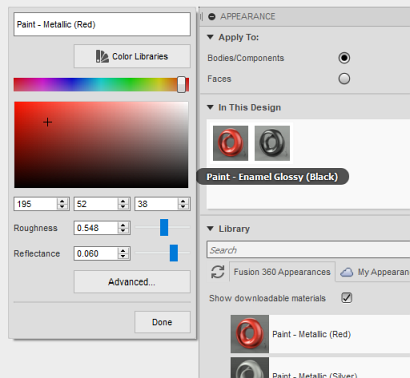
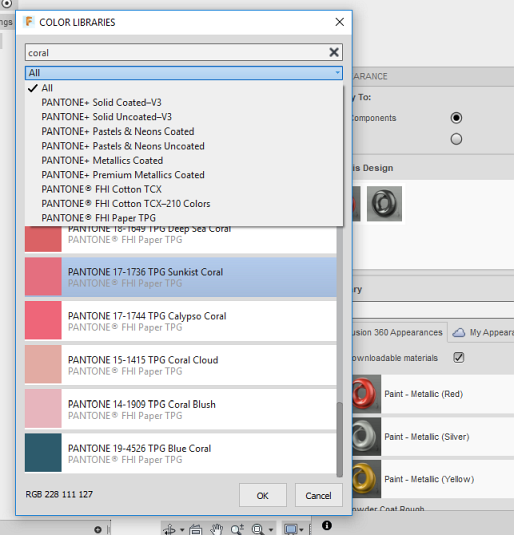
You can also extend your Fusion 360 to use RAL, BS, AS and NCS Color Libraries by downloading the RALcolours ZIP file from  Download, unzipping it to the C:\Users\[username]\AppData\Local\Autodesk\Common\Material Library\20081401\slib\resource\PantoneColors folder and restarting Fusion:
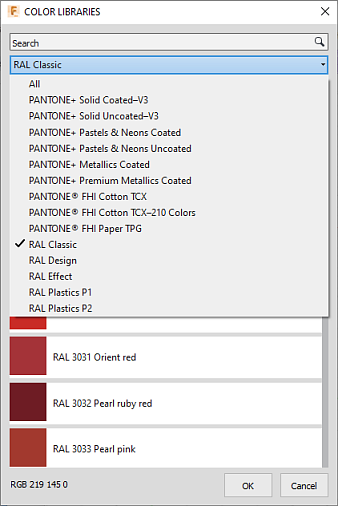
Native RAL palettes are already in the wishlist on IdeaStation
Fusion360

 *CAD
*CAD
20.3.2018
16704×
this tip shared by ARKANCE experts applies to: Fusion 360 ·



CADforum
Tips, tricks, utilities, help, how-tos and FAQ for AutoCAD, LT, Inventor, Revit, Map, Civil 3D, Fusion, Forma, 3ds Max and other Autodesk software (community support by ARKANCE). See About CADforum.
Copyright © 2026 | Advertise with us | Online privacy





