
CAD discussion forum - ask any CAD-related questions here, share your CAD knowledge on AutoCAD, Inventor, Revit and other Autodesk software with your peers from all over the world. To start a new topic, choose an appropriate forum.
Please abide by the
rules of this forum.
This is a peer-to-peer forum. The forum doesn't replace the official direct technical support provided by ARKANCE for its customers.
How to post questions: register or login, go to the specific forum and click the NEW TOPIC button.
| Author |
 Topic Search Topic Search  Topic Options Topic Options
|
dery 
Senior Member

Joined: 31.Jan.2018
Location: United States
Using: AutoCAD 2014
Status: Offline
Points: 161
|
 Topic: Modeling a Modern Roof Tile Topic: Modeling a Modern Roof Tile
Posted: 05.Oct.2024 at 06:22 |
|
I would like to create a 3D model of a modern house but I don't know how to model a modern roof tile. So, can anyone help me please step-by-step of how to 3D modeling a modern roof tile using AutoCAD 2014? Thank you.
|
 |
dery
Senior Member
Joined: 31.Jan.2018
Location: United States
Using: AutoCAD 2014
Status: Offline
Points: 161
|
Posted: 20.Oct.2024 at 07:32 |
How do you arrange the position of the roof tile such as shown on below image? In this example, the thickness of the rooftile is 1 and the length is 10.
|
|
Kent Cooper
Senior Member
Joined: 12.Mar.2013
Location: United States
Using: AutoCAD2020, 2023
Status: Offline
Points: 687
|
Posted: 21.Oct.2024 at 19:01 |
So it seems a "modern roof tile" is just a rectangular cross section? (That was much too generic a wording to base any response on -- there are countless shapes, sizes, materials, thicknesses, etc.)
If what you want for a simple rectangular profile is to angle them for installed overlap, it's not difficult, but you need one more piece of information: the distance along the roof slope between courses, or what might be called the "pitch" or the "exposure."
|
|
dery
Senior Member
Joined: 31.Jan.2018
Location: United States
Using: AutoCAD 2014
Status: Offline
Points: 161
|
Posted: 24.Oct.2024 at 05:11 |
|
Can you please show me step by step animation how to overlap the rooftile?
|
|
Kent Cooper
Senior Member
Joined: 12.Mar.2013
Location: United States
Using: AutoCAD2020, 2023
Status: Offline
Points: 687
|
Posted: 25.Oct.2024 at 15:46 |
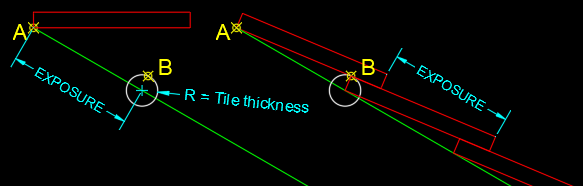 Draw the tile profile horizontally [red on the left], with its corner on the roof slope line at point A. Draw a Circle whose radius is the tile thickness [white], down the slope of the roof by the exposure distance. Rotate the tile profile, using point A as the rotation base point, and for the rotation angle, use TANgent Object Snap to get point B -- the result is the uppermost red tile at right. Copy multiple times [or Array] that rotated tile down the slope, spaced at the exposure distance. Erase the temporary Circle. Extrude the profile into a 3D Solid if you want it modeled in 3D. Copy or Array them into rows on the roof. You would presumably need to Move every other row of resulting tiles by half the tile width.
Edited by Kent Cooper - 25.Oct.2024 at 15:53
|
|
dery
Senior Member
Joined: 31.Jan.2018
Location: United States
Using: AutoCAD 2014
Status: Offline
Points: 161
|
Posted: 31.Oct.2024 at 13:43 |
|
I still don't understand. Can you write in structured, more detailed step-by-step?
|
|
Kent Cooper
Senior Member
Joined: 12.Mar.2013
Location: United States
Using: AutoCAD2020, 2023
Status: Offline
Points: 687
|
Posted: 31.Oct.2024 at 16:54 |
|
I don't think I can. I could put numbers 1, 2, 3 at the beginnings of the sentences, but you can do that for yourself if that's helpful. Take it one sentence at a time -- do what it says, then move on to the next sentence, etc. If you can be more specific about where in the sequence you don't understand something, maybe I can suggest something.
|
|
dery
Senior Member
Joined: 31.Jan.2018
Location: United States
Using: AutoCAD 2014
Status: Offline
Points: 161
|
Posted: 01.Nov.2024 at 06:39 |
|
This is one of few which I don't understand:
"down the slope of the roof by the exposure distance."
What does it means, what should I do, and how to do it in Autocad?
Edited by dery - 01.Nov.2024 at 09:18
|
|
Kent Cooper
Senior Member
Joined: 12.Mar.2013
Location: United States
Using: AutoCAD2020, 2023
Status: Offline
Points: 687
|
Posted: 01.Nov.2024 at 16:39 |
The image explains that as well as more words could -- it shows you where the white Circle should be located.
These should be rather fundamental concepts. I wonder whether you need to get some basic instruction in the use of the program, before embarking on modeling a building in 3D down to the level of detail of individual roof tiles.
|
|
dery
Senior Member
Joined: 31.Jan.2018
Location: United States
Using: AutoCAD 2014
Status: Offline
Points: 161
|
Posted: 02.Nov.2024 at 04:14 |
|
So, what should I do? Could you show me please step by step animation using gif?
Edited by dery - 02.Nov.2024 at 05:16
|
|
![CAD Forum - tips, tricks, discussion and utilities for AutoCAD, Inventor, Revit and other Autodesk products [www.cadforum.cz]](/common/arkance_186.png "CAD Forum - ARKANCE Community - tips, tricks, discussion and utilities for AutoCAD, Inventor, Revit and other Autodesk products [www.cadforum.cz]")



 Discussion forum


 Modeling a Modern Roof Tile

 Tweet
Tweet







