![CAD Forum - tips, tricks, discussion and utilities for AutoCAD, Inventor, Revit and other Autodesk products [www.cadforum.cz]](/common/arkance_186.png "CAD Forum - ARKANCE Community - tips, tricks, discussion and utilities for AutoCAD, Inventor, Revit and other Autodesk products [www.cadforum.cz]")
CAD FORUM - TIPS & TRICKS | UTILITIES | DISCUSSION | BLOCKS | SUPPORT | HELP & ADVICE

Over 1.127.000 registered users (EN+CZ).
AutoCAD tips, Inventor tips, Revit tips, Civil tips, Fusion tips.
The new Beam calculator, Spirograph generator and Regression curves in the Converters section.
New AutoCAD 2027 commands and sys.variables


 Discussion forum
?CAD discussions, advices, exchange of experience
 CAD discussion forum - ask any CAD-related questions here, share your CAD knowledge on AutoCAD, Inventor, Revit and other Autodesk software with your peers from all over the world. To start a new topic, choose an appropriate forum.
Please abide by the rules of this forum.
This is a peer-to-peer forum. The forum doesn't replace the official direct technical support provided by ARKANCE for its customers.
How to post questions: register or login, go to the specific forum and click the NEW TOPIC button.


|
 Measuring a line as a diameter?
Post Reply 
|
| Author | ||
vegtribe 
Newbie 
Joined: 21.Feb.2015 Location: Australia Using: AutoCAD 2013 Status: Offline Points: 7 |
 Topic: Measuring a line as a diameter? Topic: Measuring a line as a diameter?Posted: 02.Mar.2015 at 13:27 |
|
Perfect! That's exactly the kind of functionality I was expecting to find, just didn't know how to implemet it, thanks! |
||
 |
||
|
Kent Cooper
Senior Member 
Joined: 12.Mar.2013 Location: United States Using: AutoCAD2020, 2023 Status: Offline Points: 687 |
Posted: 23.Feb.2015 at 20:37 |
|
|
And of course, you can always define for yourself a for-the-purpose Dimension Style that includes the diameter symbol, whether as a suffix or a prefix -- see this discussion.
|
||
|
||
|
John Connor
Senior Member
Joined: 01.Feb.2011 Location: United States Using: AutoCAD 2018 Status: Offline Points: 7175 |
Posted: 23.Feb.2015 at 15:39 |
|
|
If this is going to be a common occurrence then do not follow my advice.
|
||
|
"Humans have a strength that cannot be measured. This is John Connor. If you are reading this, you are the resistance."
<<AutoCAD 2015>> |
||
|
||
|
Kent Cooper
Senior Member
Joined: 12.Mar.2013 Location: United States Using: AutoCAD2020, 2023 Status: Offline Points: 687 |
Posted: 23.Feb.2015 at 14:54 |
|
Better than that, don't give it the [in this case] 4.4 part, but use the measured-value place-holder <> mentioned by Robert_D together with the diameter [or other] symbol for the override text content:
<>%%C
That will mean that if you Stretch the drawn elements and Dimension, the numerical part will update correctly [which it won't do if you type in the 4.4], and the diameter symbol will still be there. |
||
|
||
|
vegtribe
Newbie
Joined: 21.Feb.2015 Location: Australia Using: AutoCAD 2013 Status: Offline Points: 7 |
Posted: 22.Feb.2015 at 06:14 |
|
|
Thanks for both solutions! Good to know them.
|
||
|
||
|
Robert_D
Senior Member
Joined: 21.Oct.2013 Location: United States Using: BricsCAD v25, AutoCAD2006 Status: Offline Points: 214 |
Posted: 21.Feb.2015 at 23:55 |
|
|
Another alternative (there are always numerous alternatives in ACad) is to dbl click on the dim text. In text editor select ‘symbol’ you can change the text, add diameter symbol, plus/minus symbol, degrees, etc. Note: to default back to base dimension, enter <>. Edited by Robert_D - 21.Feb.2015 at 23:57 |
||
|
||
|
John Connor
Senior Member
Joined: 01.Feb.2011 Location: United States Using: AutoCAD 2018 Status: Offline Points: 7175 |
Posted: 21.Feb.2015 at 14:56 |
|
|
Look at the command line (see below). There is a Text option during the dimensioning procedure. Your Help file should have an explanation of how it works as well.
Specify dimension line location or [Mtext/Text/Angle/Horizontal/Vertical/Rotated]: T Enter dimension text <4.4150>: 4.4%%C Result: 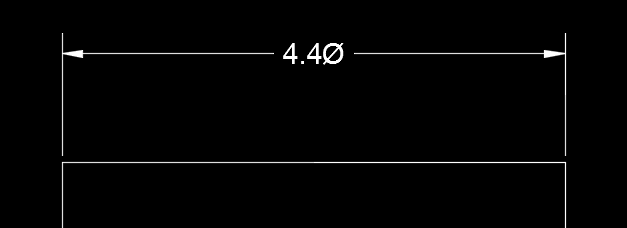 Edited by John Connor - 21.Feb.2015 at 16:37 |
||
|
"Humans have a strength that cannot be measured. This is John Connor. If you are reading this, you are the resistance."
<<AutoCAD 2015>> |
||
|
||
|
vegtribe
Newbie
Joined: 21.Feb.2015 Location: Australia Using: AutoCAD 2013 Status: Offline Points: 7 |
Posted: 21.Feb.2015 at 12:39 |
|
|
Nope, I'm a student of CAD so I didn't know it existed. How does one go about overriding the dimension text?
|
||
|
||
|
John Connor
Senior Member
Joined: 01.Feb.2011 Location: United States Using: AutoCAD 2018 Status: Offline Points: 7175 |
Posted: 21.Feb.2015 at 12:20 |
|
|
Just override the dimension text. You do know the option exists right?
|
||
|
"Humans have a strength that cannot be measured. This is John Connor. If you are reading this, you are the resistance."
<<AutoCAD 2015>> |
||
|
||
|
vegtribe
Newbie
Joined: 21.Feb.2015 Location: Australia Using: AutoCAD 2013 Status: Offline Points: 7 |
Posted: 21.Feb.2015 at 05:38 |
|
|
I want to show the diameter of the end of a cylinder looked at from the side so it's drawn as a Line but the Diameter tool only measures arcs or circles while Linear Dimension doesn't insert the diameter symbol.
Any ways to work this? Thanks.
|
||
|
||

 Topic Options
 Kent Cooper wrote:
|
Post Reply
|
|
 Tweet
Tweet
|
| Forum Jump | Forum Permissions You cannot post new topics in this forum You cannot reply to topics in this forum You cannot delete your posts in this forum You cannot edit your posts in this forum You cannot create polls in this forum You cannot vote in polls in this forum |
This page was generated in 0,074 seconds.

CADforum
Tips and tricks, support, utilities, help, discussions on AutoCAD, LT, Inventor, Revit, Map, Civil 3D, 3ds Max, Fusion, Forma, Vault, PowerMill and other Autodesk software (community support by ARKANCE). See About CADforum.
Copyright © 2026 | Advertise with us | Online privacy






