![CAD Forum - tips, tricks, discussion and utilities for AutoCAD, Inventor, Revit and other Autodesk products [www.cadforum.cz]](/common/arkance_186.png "CAD Forum - ARKANCE Community - tips, tricks, discussion and utilities for AutoCAD, Inventor, Revit and other Autodesk products [www.cadforum.cz]")
CAD FORUM - TIPS & TRICKS | UTILITIES | DISCUSSION | BLOCKS | SUPPORT | HELP & ADVICE

Over 1.133.000 registered users (EN+CZ).
AutoCAD tips, Inventor tips, Revit tips, Civil tips, Fusion tips.
See the new Beam calculator, Engineering calculator, Tolerances, Spirograph generator and Regression curves in the Converters section.
New AutoCAD 2027 commands and sys.variables


 Discussion forum
?CAD discussions, advices, exchange of experience
 CAD discussion forum - ask any CAD-related questions here, share your CAD knowledge on AutoCAD, Inventor, Revit and other Autodesk software with your peers from all over the world. To start a new topic, choose an appropriate forum.
Please abide by the rules of this forum.
This is a peer-to-peer forum. The forum doesn't replace the official direct technical support provided by ARKANCE for its customers.
How to post questions: register or login, go to the specific forum and click the NEW TOPIC button.


How to Draw This Container? |
Post Reply 
|
| Author | |
teknol 
Newbie 
Joined: 01.May.2026 Location: United States Status: Offline Points: 8 |
 Post Options Post Options
 Thanks(0) Thanks(0)
 Quote Reply Quote Reply
 Topic: How to Draw This Container? Topic: How to Draw This Container?Posted: 03.Jun.2026 at 01:41 |
|
Hi everyone,
Could someone help me please how to draw this water container as close as possible to the image? Thank you 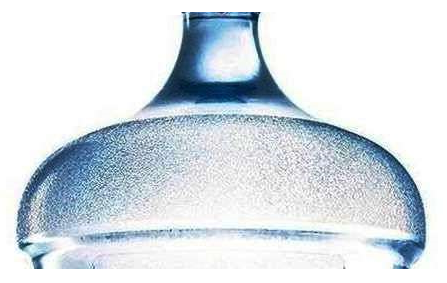 Edited by teknol - 03.Jun.2026 at 02:17 |
|
 |
|
|
Vladimir Michl
Moderator Group 
Joined: 26.Jul.2007 Location: Czech Republic Using: Autodesk software Status: Offline Points: 2188 |
Post Options
Thanks(0)
Quote Reply
Posted: 03.Jun.2026 at 08:22 |
|
In AutoCAD? REVOLVE a profile.
|
|
|
Vladimir Michl (moderator)
LinkedIn, Autodesk Expert Elite |
|
|
|
|
teknol
Newbie
Joined: 01.May.2026 Location: United States Status: Offline Points: 8 |
Post Options
Thanks(0)
Quote Reply
Posted: 03.Jun.2026 at 22:59 |
|
How to draw the profile as close as possible to the reference image?
Edited by teknol - 03.Jun.2026 at 23:08 |
|
|
|
|
Vladimir Michl
Moderator Group
Joined: 26.Jul.2007 Location: Czech Republic Using: Autodesk software Status: Offline Points: 2188 |
Post Options
Thanks(0)
Quote Reply
Posted: 03.Jun.2026 at 23:29 |
|
Either measure the distances and draw the profile polyline segments, or make an "orthographic" photo, underlay it your AutoCAD drawing a redraw its outline, or make a contrast photo a use a vectorization software or web service to generate the polyline outline.
|
|
|
Vladimir Michl (moderator)
LinkedIn, Autodesk Expert Elite |
|
|
|
|
teknol
Newbie
Joined: 01.May.2026 Location: United States Status: Offline Points: 8 |
Post Options
Thanks(0)
Quote Reply
Posted: 03.Jun.2026 at 23:47 |
|
Could you please show me step by step of how to draw the profile as close as possible to the image.
Edited by teknol - 03.Jun.2026 at 23:58 |
|
|
|
|
Vladimir Michl
Moderator Group
Joined: 26.Jul.2007 Location: Czech Republic Using: Autodesk software Status: Offline Points: 2188 |
Post Options
Thanks(0)
Quote Reply
Posted: 07.Jun.2026 at 12:41 |
|
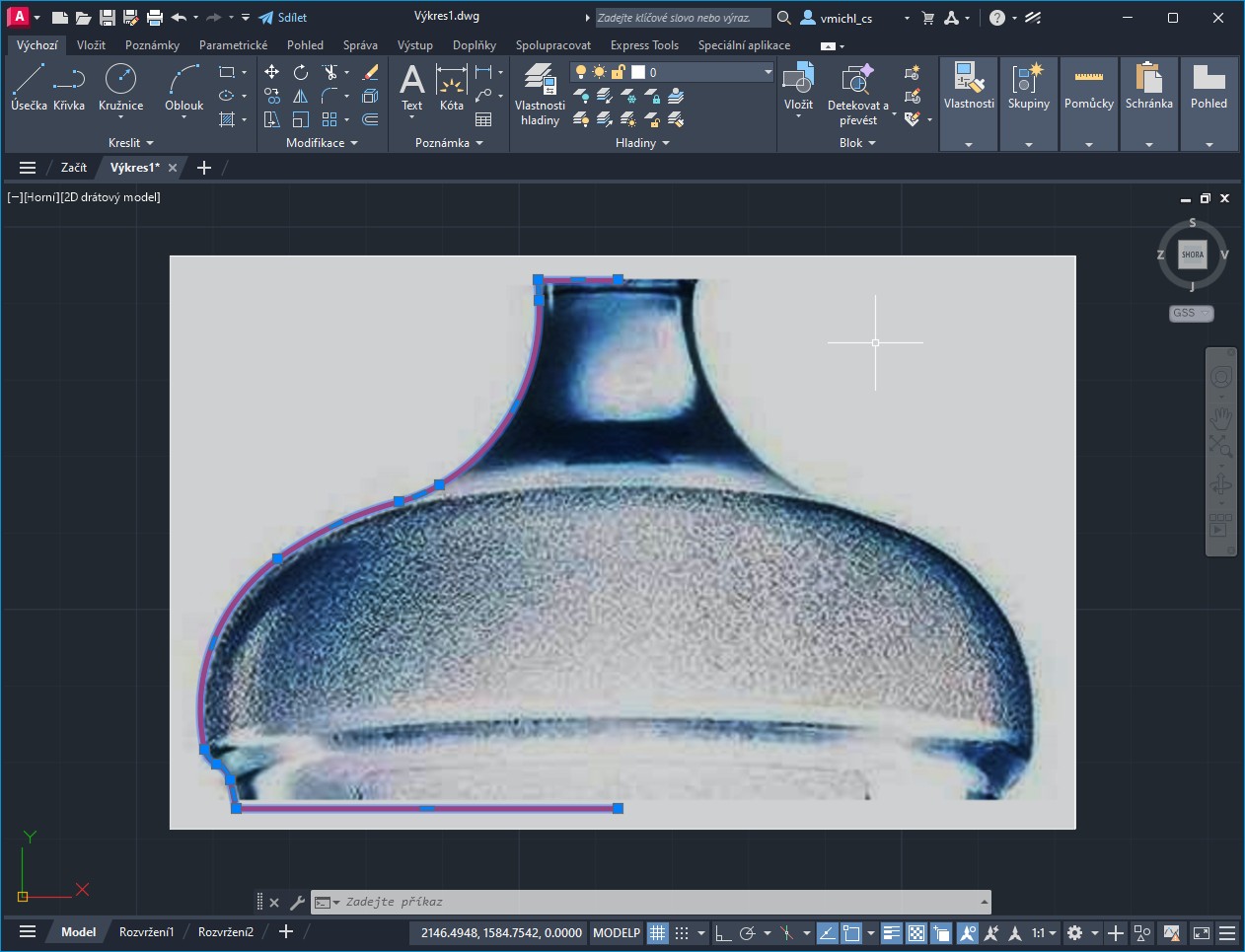
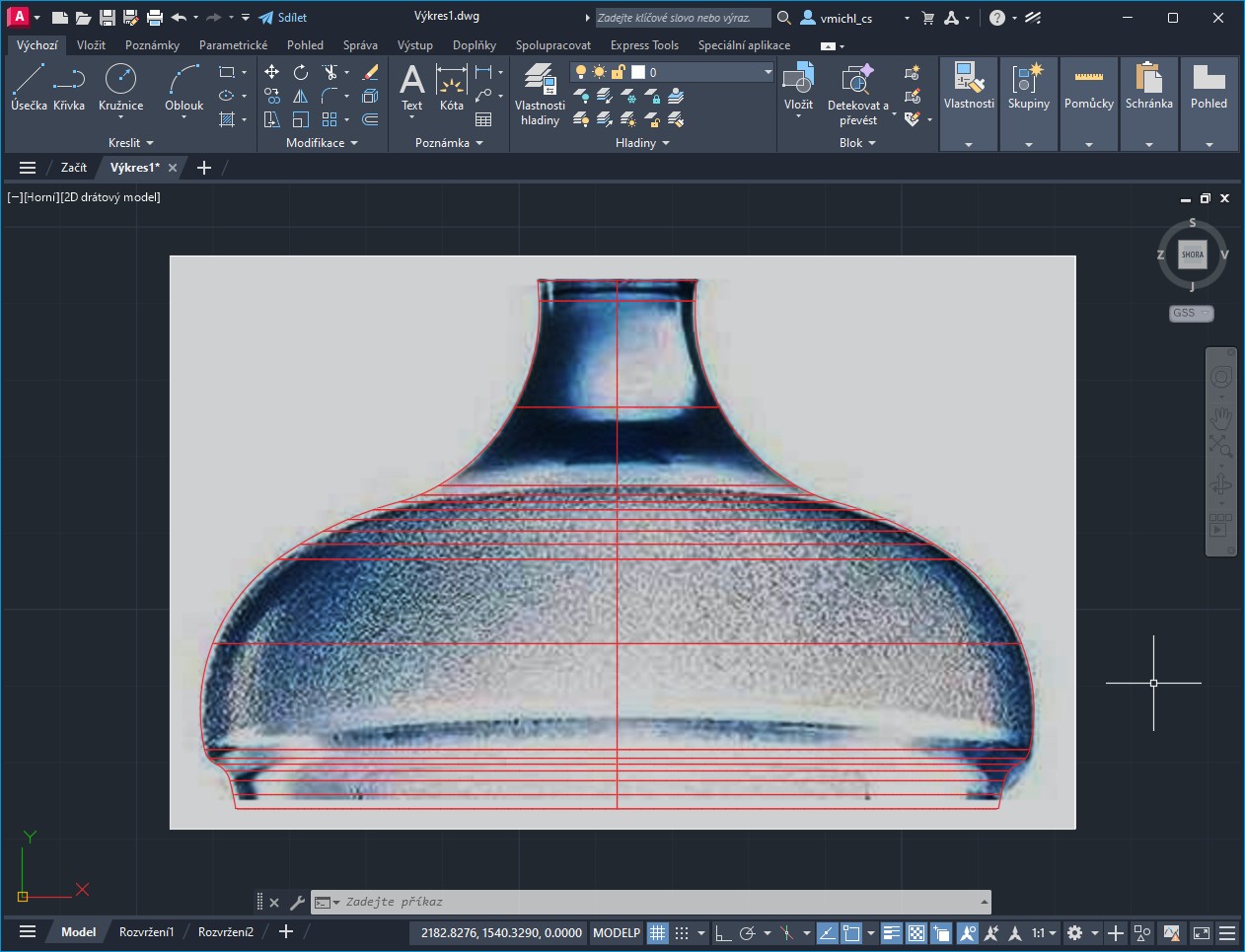
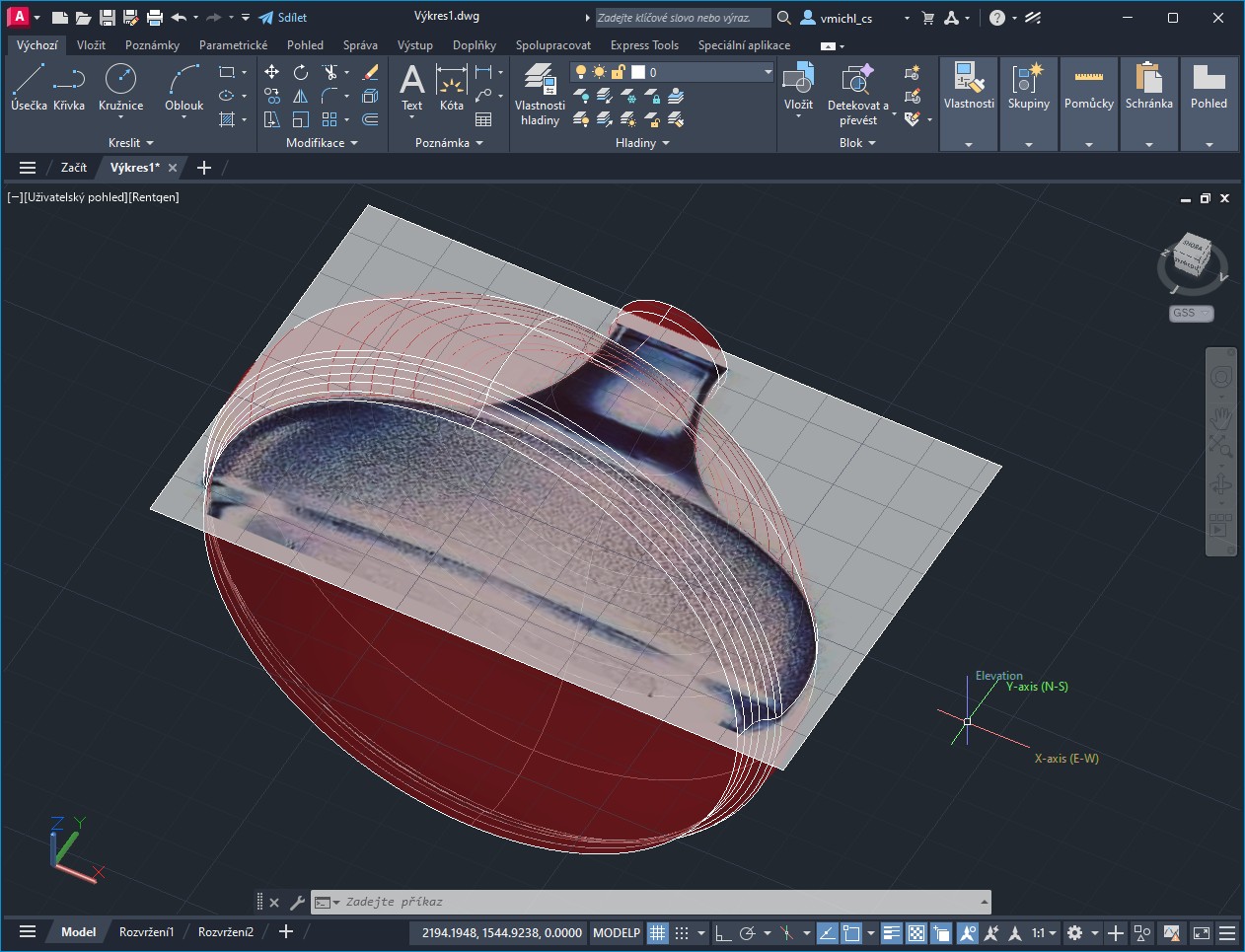
Here - IMAGEATTACH, PLINE, REVOLVE, SCALE
   Edited by Vladimir Michl - 07.Jun.2026 at 12:57 |
|
|
Vladimir Michl (moderator)
LinkedIn, Autodesk Expert Elite |
|
|
|
|
teknol
Newbie
Joined: 01.May.2026 Location: United States Status: Offline Points: 8 |
Post Options
Thanks(0)
Quote Reply
Posted: 07.Jun.2026 at 13:01 |
|
That's great! How do I do that? Please tell me step by step with instructions. How do I draw the curve?
|
|
|
|
|
Vladimir Michl
Moderator Group
Joined: 26.Jul.2007 Location: Czech Republic Using: Autodesk software Status: Offline Points: 2188 |
Post Options
Thanks(0)
Quote Reply
Posted: 08.Jun.2026 at 12:35 |
|
There is nothing much to add - attach the image (IMAGEATTACH), while zooming, draw the polyline along the borders with the PLINE command (using the Arc or Line options where neccessary), add the horizontal segments pointing to the axis (JOIN), REVOLVE the polyline along the vertical axis, SCALE the model to real dimensions.
|
|
|
Vladimir Michl (moderator)
LinkedIn, Autodesk Expert Elite |
|
|
|
|
teknol
Newbie
Joined: 01.May.2026 Location: United States Status: Offline Points: 8 |
Post Options
Thanks(0)
Quote Reply
Posted: 08.Jun.2026 at 14:13 |
|
The one that I can't do is to draw the curve (which you said by using PLINE command) as close as possible to the image. Could you show me, perhaps using the GIF animation, so that I can see the process of how it is made?
|
|
|
|
 Topic Options
|
Post Reply
|
|
 Tweet
Tweet
|
| Forum Jump | Forum Permissions You cannot post new topics in this forum You cannot reply to topics in this forum You cannot delete your posts in this forum You cannot edit your posts in this forum You cannot create polls in this forum You cannot vote in polls in this forum |
This page was generated in 0,148 seconds.

CADforum
Tips and tricks, support, utilities, help, discussions on AutoCAD, LT, Inventor, Revit, Map, Civil 3D, 3ds Max, Fusion, Forma, Vault, PowerMill and other Autodesk software (community support by ARKANCE). See About CADforum.
Copyright © 2026 | Advertise with us | Online privacy






