![CAD Forum - tips, tricks, discussion and utilities for AutoCAD, Inventor, Revit and other Autodesk products [www.cadforum.cz]](../common/arkance_186.png "CAD Forum - ARKANCE Community - tips, tricks, discussion and utilities for AutoCAD, Inventor, Revit and other Autodesk products [www.cadforum.cz]")
CAD FORUM - TIPS & TRICKS | UTILITIES | DISCUSSION | BLOCKS | SUPPORT | HELP & ASSISTANCE

Over 1.116.000 registered users (EN+CZ).
AutoCAD tips, Inventor tips, Revit tips, Civil tips, Fusion tips.
The new Beam calculator, Spirograph generator and Regression curves in the Converters section.
 CAD tip # 11515:
Question
A
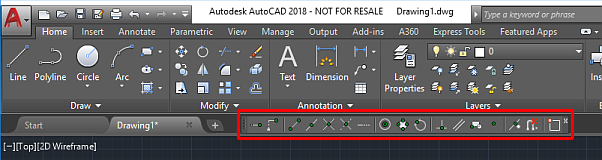
If you prefer to have the old Object snap toolbar displayed permanently in your AutoCAD window, you can show it even in newer AutoCAD versions.
Type the -TOOLBAR command (note the "-") and on the "Toolbar name" prompt, enter:
"Object Snap"
(note the double quotes)
Confirm the "Show" option by pressing [Enter]. The toolbar will be be displayed.
ACAD2018ACAD2017ACAD2016ACLT

 *CAD
*CAD
6.7.2017
51741×
this tip shared by ARKANCE experts applies to: AutoCAD 2018 · AutoCAD 2017 · AutoCAD 2016 · AutoCAD LT ·



CADforum
Tips, tricks, utilities, help, how-tos and FAQ for AutoCAD, LT, Inventor, Revit, Map, Civil 3D, Fusion, Forma, 3ds Max and other Autodesk software (community support by ARKANCE). See About CADforum.
Copyright © 2026 | Advertise with us | Online privacy