![CAD Forum - tips, tricks, discussion and utilities for AutoCAD, Inventor, Revit and other Autodesk products [www.cadforum.cz]](/common/arkance_186.png "CAD Forum - ARKANCE Community - tips, tricks, discussion and utilities for AutoCAD, Inventor, Revit and other Autodesk products [www.cadforum.cz]")
CAD FORUM - TIPS & TRICKS | UTILITIES | DISCUSSION | BLOCKS | SUPPORT | HELP & ADVICE

Over 1.132.000 registered users (EN+CZ).
AutoCAD tips, Inventor tips, Revit tips, Civil tips, Fusion tips.
See the new Beam calculator, Engineering calculator, Tolerances, Spirograph generator and Regression curves in the Converters section.
New AutoCAD 2027 commands and sys.variables


 Discussion forum
?CAD discussions, advices, exchange of experience
 CAD discussion forum - ask any CAD-related questions here, share your CAD knowledge on AutoCAD, Inventor, Revit and other Autodesk software with your peers from all over the world. To start a new topic, choose an appropriate forum.
Please abide by the rules of this forum.
This is a peer-to-peer forum. The forum doesn't replace the official direct technical support provided by ARKANCE for its customers.
How to post questions: register or login, go to the specific forum and click the NEW TOPIC button.


|
 Text display issue
Post Reply 
|
| Author | |
John Connor 
Senior Member 
Joined: 01.Feb.2011 Location: United States Using: AutoCAD 2018 Status: Offline Points: 7175 |
 Topic: Text display issue Topic: Text display issuePosted: 20.Dec.2016 at 11:37 |
|
What font is being used?
Is the text annotative? If you start a new drawing and insert a keynote in it does the same problem occur? Can you attach a copy of the drawing to your next post so we can take a look at it ourselves? Images are nice but one cannot troubleshoot a problem properly using an image. |
|
|
"Humans have a strength that cannot be measured. This is John Connor. If you are reading this, you are the resistance."
<<AutoCAD 2015>> |
|
 |
|
|
Vladimir Michl
Moderator Group 
Joined: 26.Jul.2007 Location: Czech Republic Using: Autodesk software Status: Offline Points: 2188 |
Posted: 20.Dec.2016 at 08:29 |
|
I would take a damaged font file or a graphics card issue as suspects.
|
|
|
Vladimir Michl (moderator)
LinkedIn, Autodesk Expert Elite |
|
|
|
|
mardix
Newbie 
Joined: 20.Dec.2016 Location: United States Using: AutoCAD2015 Status: Offline Points: 2 |
Posted: 20.Dec.2016 at 03:43 |
|
Hi all! Hopefully someone with more CAD knowledge then me can help me with my problem I am running AutoCAD 2015 and cant seem to resolve the problem. The keynotes are set up as blocks with attributes. 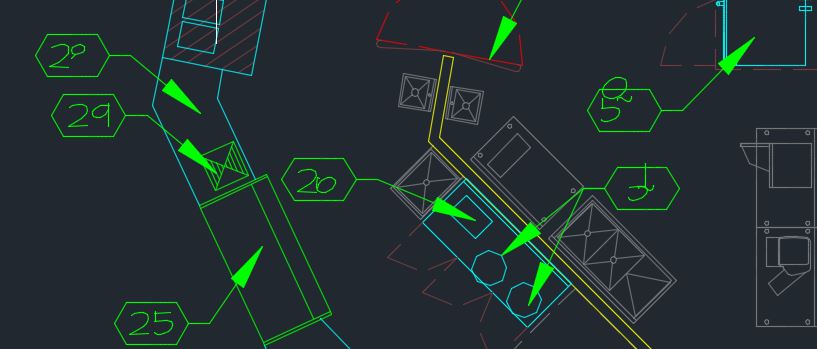 If I change the text in an affected key note it displays properly for awhile, only to distort again when the file is closed and re-opened. The affected keynotes appear to be random and change each time the file is opened. Sometimes they are slightly distorted like the attached pics, but other times they have large lines going every which way across the screen. It seems to only be affecting a couple of computers in the office, others can open the same file with no distortion. Is anyone familiar with this issue? Help! Thanks Ken
|
|
|
|

 Topic Options
|
Post Reply
|
|
 Tweet
Tweet
|
| Forum Jump | Forum Permissions You cannot post new topics in this forum You cannot reply to topics in this forum You cannot delete your posts in this forum You cannot edit your posts in this forum You cannot create polls in this forum You cannot vote in polls in this forum |
This page was generated in 0,148 seconds.

CADforum
Tips and tricks, support, utilities, help, discussions on AutoCAD, LT, Inventor, Revit, Map, Civil 3D, 3ds Max, Fusion, Forma, Vault, PowerMill and other Autodesk software (community support by ARKANCE). See About CADforum.
Copyright © 2026 | Advertise with us | Online privacy






